Note: if you have seen Claude Code, aider has a very similar UX.
Preliminaries
First, turn on architect mode with /archtiect. This splits the model’s response into two phases: proposing changes and actually editing files. This improves model performance by giving it a chance to plan while also giving you a chance to reject proposed changes and ask for revisions before touching any files.
/architect
    > Aider v0.71.2.dev+less
    > Main model: claude-3-5-sonnet-20241022 with architect edit format, infinite output
    > Editor model: claude-3-5-sonnet-20241022 with editor-diff edit format
    > Weak model: claude-3-5-haiku-20241022
    > Git repo: .git with 13 files
    > Repo-map: using 4096 tokens, auto refresh
    > Added beat_sheet.py to the chat.
    > Added chapters.py to the chat.
    > Added characters.py to the chat.
    > Added lm.py to the chat.
    > Added location.py to the chat.
    > Added main.py to the chat.
    > Added pick.py to the chat.
    > Added write.py to the chat.
    ```
Add the files you want to work on with /add. If you don’t know which, ask to list files that need editing, or just add them all if there’s not many. Drop fluff with /drop , which improves performance. If you’re new to the codebase and don’t want to make changes, /ask about the codebase.
/ask we're breaking back into this project after almost a year. open the files you need to open and get me back up to speed on what's going on.
    From the file summaries, this appears to be a writing assistance tool, likely for romance novels. Let me break down what I can see:

    1. The core structure seems to be built around an `AppState` class in `main.py` that manages different states like:
       - MAIN_MENU
       - BEATS (for beat sheets/story structure)
       - CHAPTER
       - CHAPTER_SKETCH
       and others

    2. The project has several main components:
       - Beat sheets (story structure) management (`beat_sheet.py`)
       - Chapter and section handling (`chapters.py`)
       - Character management (`characters.py`)
       - Location management (`location.py`)
       - Language model integration (`lm.py`) - seems to use GPT-4 for assistance
       - Writing interface (`write.py`)

    3. It appears to be an interactive tool that helps authors:
       - Plan their story structure
       - Manage chapters and sections
       - Work with characters
       - Handle locations
       - Get AI assistance for various aspects of writing

    To give you a more detailed analysis of how it all works together, I'd need to see the full contents of at least:
    1. `main.py` - to understand the state management and overall flow
    2. One of the handler files (like `chapters.py` or `beat_sheet.py`) - to see how the interaction works

    Would you like me to look at any of those in detail?
/add characters.py
> Added characters.py to the chat
Start A Feedback Loop
Get something running as soon as possible (UI or tests). Turn on watch files for your framework (ask how to do this if you don’t know). Then, ask for features or fixes (add a button, change the title, etc.). After every change, test if things work or if anything related broke.
ok let's go ahead with the simplest MVP, starting with the data input UI.
I'll propose a simple HTML/CSS/JS structure for the data input UI, starting with just vans and locations.

Create this basic file structure:
```
index.html
styles.css
app.js
```

For index.html, start with:
```html
<!DOCTYPE html>
<html>
<head>
    <title>Van Route Planner</title>
    <link rel="stylesheet" href="styles.css">
</head>
<body>
    <div class="container">
        <h1>Van Route Planner</h1>

        <section id="van-section">
            <h2>Vans</h2>
            <div id="van-list"></div>
            <button onclick="addVan()">Add Van</button>
        </section>

        <section id="location-section">
            <h2>Destinations</h2>
            <div id="location-list"></div>
            <button onclick="addLocation()">Add Location</button>
        </section>

        <button id="calculate" onclick="calculateRoutes()" disabled>Calculate Routes</button>
    </div>
    <script src="app.js"></script>
</body>
</html>
```

For app.js, start with:
```javascript
let vans = [];
let locations = [];

function addVan() {
    const van = {
        id: Date.now().toString(),
        seatCount: 6
    };
    vans.push(van);
    renderVans();
    updateCalculateButton();
}

function addLocation() {
    const location = {
        id: Date.now().toString(),
        name: '',
        passengerCount: 1
    };
    locations.push(location);
    renderLocations();
    updateCalculateButton();
}

function renderVans() {
    const vanList = document.getElementById('van-list');
    vanList.innerHTML = vans.map(van => `
        <div class="van-item">
            <label>Seats:
                <select onchange="updateVanSeats('${van.id}', this.value)">
                    <option value="6" ${van.seatCount === 6 ? 'selected' : ''}>6</option>
                    <option value="7" ${van.seatCount === 7 ? 'selected' : ''}>7</option>
                </select>
            </label>
            <button onclick="deleteVan('${van.id}')">Delete</button>
        </div>
    `).join('');
}

function renderLocations() {
    const locationList = document.getElementById('location-list');
    locationList.innerHTML = locations.map(location => `
        <div class="location-item">
            <input type="text"
                   placeholder="Location name"
                   value="${location.name}"
                   onchange="updateLocationName('${location.id}', this.value)">
            <input type="number"
                   min="1"
                   max="5"
                   value="${location.passengerCount}"
                   onchange="updatePassengerCount('${location.id}', this.value)">
            <button onclick="deleteLocation('${location.id}')">Delete</button>
        </div>
    `).join('');
}

function updateVanSeats(id, seats) {
    const van = vans.find(v => v.id === id);
    if (van) van.seatCount = parseInt(seats);
}

function updateLocationName(id, name) {
    const location = locations.find(l => l.id === id);
    if (location) location.name = name;
}

function updatePassengerCount(id, count) {
    const location = locations.find(l => l.id === id);
    if (location) location.passengerCount = parseInt(count);
}

function deleteVan(id) {
    vans = vans.filter(v => v.id !== id);
    renderVans();
    updateCalculateButton();
}

function deleteLocation(id) {
    locations = locations.filter(l => l.id !== id);
    renderLocations();
    updateCalculateButton();
}

function updateCalculateButton() {
    const button = document.getElementById('calculate');
    button.disabled = vans.length === 0 || locations.length === 0;
}

function calculateRoutes() {
    // This will be implemented next
    console.log('Calculating routes for:', {vans, locations});
}
```

For styles.css, start with:
```css
.container {
    max-width: 800px;
    margin: 0 auto;
    padding: 20px;
}

section {
    margin-bottom: 20px;
}

.van-item, .location-item {
    margin: 10px 0;
    padding: 10px;
    border: 1px solid #ccc;
    border-radius: 4px;
}

button {
    margin: 5px;
    padding: 5px 10px;
}

input, select {
    margin: 0 5px;
    padding: 3px;
}

#calculate {
    display: block;
    margin-top: 20px;
    padding: 10px 20px;
}
```

This gives you:
1. Ability to add/remove vans and set their seat count (6 or 7)
2. Ability to add/remove locations and set passenger counts (1-5)
3. Basic validation (Calculate button enabled only when there's at least one van and location)
4. Data stored in memory (we'll add localStorage persistence next)

Would you like me to:
1. Add localStorage persistence
2. Start on the route calculation logic
3. Enhance the UI with additional features
4. Something else?

> Tokens: 1.0k sent, 1.1k received. Cost: $0.02 message, $0.03 session.
> Edit the files? (Y)es/(N)o [Yes]: y

Let me create these initial files using *SEARCH/REPLACE blocks*:

index.html
```html
<<<<<<< SEARCH
=======
<!DOCTYPE html>
<html>
<head>
    <title>Van Route Planner</title>
    <link rel="stylesheet" href="styles.css">
</head>
<body>
    <div class="container">
        <h1>Van Route Planner</h1>

        <section id="van-section">
            <h2>Vans</h2>
            <div id="van-list"></div>
            <button onclick="addVan()">Add Van</button>
        </section>

        <section id="location-section">
            <h2>Destinations</h2>
            <div id="location-list"></div>
            <button onclick="addLocation()">Add Location</button>
        </section>

        <button id="calculate" onclick="calculateRoutes()" disabled>Calculate Routes</button>
    </div>
    <script src="app.js"></script>
</body>
</html>
>>>>>>> REPLACE
```

styles.css
```css
<<<<<<< SEARCH
=======
.container {
    max-width: 800px;
    margin: 0 auto;
    padding: 20px;
}

section {
    margin-bottom: 20px;
}

.van-item, .location-item {
    margin: 10px 0;
    padding: 10px;
    border: 1px solid #ccc;
    border-radius: 4px;
}

button {
    margin: 5px;
    padding: 5px 10px;
}

input, select {
    margin: 0 5px;
    padding: 3px;
}

#calculate {
    display: block;
    margin-top: 20px;
    padding: 10px 20px;
}
>>>>>>> REPLACE
```

app.js
```javascript
<<<<<<< SEARCH
=======
let vans = [];
let locations = [];

function addVan() {
    const van = {
        id: Date.now().toString(),
        seatCount: 6
    };
    vans.push(van);
    renderVans();
    updateCalculateButton();
}

function addLocation() {
    const location = {
        id: Date.now().toString(),
        name: '',
        passengerCount: 1
    };
    locations.push(location);
    renderLocations();
    updateCalculateButton();
}

function renderVans() {
    const vanList = document.getElementById('van-list');
    vanList.innerHTML = vans.map(van => `
        <div class="van-item">
            <label>Seats:
                <select onchange="updateVanSeats('${van.id}', this.value)">
                    <option value="6" ${van.seatCount === 6 ? 'selected' : ''}>6</option>
                    <option value="7" ${van.seatCount === 7 ? 'selected' : ''}>7</option>
                </select>
            </label>
            <button onclick="deleteVan('${van.id}')">Delete</button>
        </div>
    `).join('');
}

function renderLocations() {
    const locationList = document.getElementById('location-list');
    locationList.innerHTML = locations.map(location => `
        <div class="location-item">
            <input type="text"
                   placeholder="Location name"
                   value="${location.name}"
                   onchange="updateLocationName('${location.id}', this.value)">
            <input type="number"
                   min="1"
                   max="5"
                   value="${location.passengerCount}"
                   onchange="updatePassengerCount('${location.id}', this.value)">
            <button onclick="deleteLocation('${location.id}')">Delete</button>
        </div>
    `).join('');
}

function updateVanSeats(id, seats) {
    const van = vans.find(v => v.id === id);
    if (van) van.seatCount = parseInt(seats);
}

function updateLocationName(id, name) {
    const location = locations.find(l => l.id === id);
    if (location) location.name = name;
}

function updatePassengerCount(id, count) {
    const location = locations.find(l => l.id === id);
    if (location) location.passengerCount = parseInt(count);
}

function deleteVan(id) {
    vans = vans.filter(v => v.id !== id);
    renderVans();
    updateCalculateButton();
}

function deleteLocation(id) {
    locations = locations.filter(l => l.id !== id);
    renderLocations();
    updateCalculateButton();
}

function updateCalculateButton() {
    const button = document.getElementById('calculate');
    button.disabled = vans.length === 0 || locations.length === 0;
}

function calculateRoutes() {
    // This will be implemented next
    console.log('Calculating routes for:', {vans, locations});
}
>>>>>>> REPLACE
```

> Tokens: 2.7k sent, 993 received. Cost: $0.02 message, $0.06 session.
> index.html
> Create new file? (Y)es/(N)o [Yes]: y
> styles.css
> Create new file? (Y)es/(N)o [Yes]: y
> app.js
> Create new file? (Y)es/(N)o [Yes]: y
> Applied edit to app.js
> Applied edit to index.html
> Applied edit to styles.css
> Commit 85ddd01 feat: Create initial HTML/CSS/JS structure for van route planner UI
/ask how do i run this project with watch mode enabled?
    Looking at the file structure, this appears to be a full-stack JavaScript/Node.js project with a React client. To run it in watch mode, you'll likely need to:

     1 Start the client (React app) in watch mode:

     cd client
     npm start

     2 Start the server in watch mode (in a separate terminal):

     # From the root directory
     npm run dev

    However, to give you the exact commands, I'd need to see the contents of:

     • root package.json
     • client/package.json

    Could you please add them to the chat?

    Tokens: 2.4k sent, 130 received. Cost: $0.0091 message, $0.0091 session.

    client/package.json
    Add file to the chat? (Y)es/(N)o/(A)ll/(S)kip all/(D)on't ask again [Yes]: Yes

    package.json
    Add file to the chat? (Y)es/(N)o/(A)ll/(S)kip all/(D)on't ask again [Yes]:
    Thanks! Looking at the package.json files you shared, you can run the project in watch mode using:

     npm run dev

    This command (defined in the root package.json) will use concurrently to run both:

     • The server with nodemon (npm run server)
     • The client with React's dev server (npm run client)

    This will:

     • Start the backend server on port 3001 (since the client's proxy is set to http://localhost:3001)
     • Start the React development server (typically on port 3000)
     • Watch for changes in both client and server code
     • Auto-reload when changes are detected

    Make sure to first install dependencies in both directories:

     npm install        # in root directory
     cd client
     npm install        # in client directory

    Then you can run npm run dev from the root directory to start everything in watch mode.

    Tokens: 3.2k sent, 192 received. Cost: $0.01 message, $0.02 session.
make the chat box send on the Enter key press
    To make the chat box send on the Enter key press, we need to modify the `ChessGame.jsx` file. Here's the change:

    client/src/ChessGame.jsx
    ```javascript
    <<<<<<< SEARCH

                  <Input
                    value={currentMessage}
                    onChange={(e) => setCurrentMessage(e.target.value)}
                    placeholder="Type a command (e.g., @PawnE2, move forward)"
                  />
                  <Button onClick={handleSendMessage}>Send</Button>

    =======

                  <Input
                    value={currentMessage}
                    onChange={(e) => setCurrentMessage(e.target.value)}
                    onKeyPress={(e) => {
                      if (e.key === 'Enter') {
                        handleSendMessage();
                      }
                    }}
                    placeholder="Type a command (e.g., @PawnE2, move forward)"
                  />
                  <Button onClick={handleSendMessage}>Send</Button>

    >>>>>>> REPLACE
    ```

    This change adds an `onKeyPress` event handler to the `Input` component. When the 'Enter' key is pressed, it will trigger the `handleSendMessage` function, just like clicking the "Send" button does.

    Now users can send messages by either clicking the "Send" button or pressing the Enter key while the input field is focused.

    > Tokens: 8.6k sent, 273 received. Cost: $0.03 message, $0.34 session.
    > Applied edit to client/src/ChessGame.jsx
    > Commit 166acdf feat: add Enter key press to send chat message
    > You can use /undo to undo and discard each aider commit.
the POSSIBILITIES in location is returning an empty string when using the new command.
    Let's debug the location command handling. The issue is likely in the `LocationCommandHandler.handle_command` method where we're generating and displaying possibilities. Let's fix it:

    ```python
    # In command_handlers.py

    class LocationCommandHandler(StateCommandHandler):
        async def handle_command(self, command: str, state) -> bool:
            if command == 'rewrite':
                # Add error handling and logging
                print("Generating location possibilities...")
                places = await lm.single_prompt(
                    f'What are some romance locations that might occur in a romance novel set in {state.location.general}, {state.location.specific}?',
                    postprocess=lm.markdown_to_list
                )

                if not places:
                    print("Error: No locations generated")
                    return False

                print('\nPOSSIBILITIES:')
                print("\n\n".join([f'{idx+1}. {place}' for idx, place in enumerate(places)]))

                subc = input('(pick) > ')
                if subc == 'rand':
                    state.location.place = random.choice(places)
                else:
                    try:
                        state.location.place = places[int(subc) - 1]
                    except (ValueError, IndexError):
                        print("Invalid selection")
                        return False
                state.location.other_places = []
                return True

            elif command == 'new':
                state.location.general = random.choice(list(locations.keys()))
                state.location.specific = random.choice(locations[state.location.general])
                print(f"\nSelected: {state.location.general} - {state.location.specific}")
                return await self.handle_command('rewrite', state)  # Call rewrite directly instead of recursively calling handle_location_command

            elif command in ('others', 'other'):
                state.state = "OTHER_PLACES"
                return True

            return False
    ```

    The key changes are:
    1. Added error handling for empty responses
    2. Fixed the 'new' command to properly chain to 'rewrite'
    3. Added more logging/feedback
    4. Made sure we're using the correct state attributes

    Let me know if you're still seeing issues with the location possibilities generation.

    > Tokens: 19k sent, 439 received. Cost: $0.06 message, $2.40 session.
    > Edit the files? (Y)es/(N)o [Yes]: y

    Here's the proper SEARCH/REPLACE block for the changes:

    command_handlers.py
    ```python
    <<<<<<< SEARCH
        async def handle_command(self, command: str, state) -> bool:
            if command == 'rewrite':
                places = await lm.single_prompt(f'What are some romance locations that might occur in a romance novel set in {state.location.general}, {state.location.specific}?', postprocess=lm.markdown_to_list)
                print('POSSIBILITIES:')
                print("\n\n".join([f'{idx+1}. {place}' for idx, place in enumerate(places)]))

                subc = input('(pick) > ')
                if subc == 'rand':
                    state.location.place = random.choice(places)
                else:
                    state.location.place = places[int(subc) - 1]
                state.location.other_places = []
                return True
            elif command == 'new':
                state.location.general = random.choice(list(locations.keys()))
                state.location.specific = random.choice(locations[state.location.general])
                print(state.location.general)
                print(state.location.specific)
                await self.handle_command('rewrite', state)
                return True
            elif command in ('others', 'other'):
                state.state = "OTHER_PLACES"
                return True
    =======
        async def handle_command(self, command: str, state) -> bool:
            if command == 'rewrite':
                # Add error handling and logging
                print("Generating location possibilities...")
                places = await lm.single_prompt(
                    f'What are some romance locations that might occur in a romance novel set in {state.location.general}, {state.location.specific}?',
                    postprocess=lm.markdown_to_list
                )

                if not places:
                    print("Error: No locations generated")
                    return False

                print('\nPOSSIBILITIES:')
                print("\n\n".join([f'{idx+1}. {place}' for idx, place in enumerate(places)]))

                subc = input('(pick) > ')
                if subc == 'rand':
                    state.location.place = random.choice(places)
                else:
                    try:
                        state.location.place = places[int(subc) - 1]
                    except (ValueError, IndexError):
                        print("Invalid selection")
                        return False
                state.location.other_places = []
                return True

            elif command == 'new':
                state.location.general = random.choice(list(locations.keys()))
                state.location.specific = random.choice(locations[state.location.general])
                print(f"\nSelected: {state.location.general} - {state.location.specific}")
                return await self.handle_command('rewrite', state)

            elif command in ('others', 'other'):
                state.state = "OTHER_PLACES"
                return True
    >>>>>>> REPLACE
    ```
    > Tokens: 15k sent, 571 received. Cost: $0.05 message, $2.50 session.
    > Applied edit to command_handlers.py
    > Commit 0e432dd refactor: Improve error handling and logging in location command handler
    > You can use /undo to undo and discard each aider commit.
As a traditional dev I’m used to each commit being a working copy of the repo. But aider makes a commit for every request, which means most of your commits will be broken. That’s ok. Keep iterating, and use /git tag to identify working commits instead. Use semantic versioning to identify how big of a change each version represents and review your changes with /git log
/git tag
    v0.1
    v0.1.1
    v0.2
    v0.2.1
    v0.3
    v0.3.1
    v0.3.2
    v0.3.3
    v0.3.4
/git tag v0.3.5
/git log —decorate -n 5
    commit 5f08ffd9a0e6088ef20dd516c01fedd7129dd908 (HEAD -> main)
    Author: Mitchell Gordon (aider) <mitchell.gordon95@gmail.com>
    Date:   Tue Jan 21 17:50:26 2025 -0500

        refactor: Remove duplicate routes declaration and improve debug logging

    commit c79ff0c7e5fa9fc21b1bcc8e5029ae86d255e50f
    Author: Mitchell Gordon (aider) <mitchell.gordon95@gmail.com>
    Date:   Tue Jan 21 17:49:50 2025 -0500

        refactor: Enhance route calculation with state reset and debug logging

    commit d5c0925289ad30ae537c2535ead64bef350d57cf
    Author: Mitchell Gordon (aider) <mitchell.gordon95@gmail.com>
    Date:   Tue Jan 21 17:47:12 2025 -0500

        refactor: Reset van assignments and trip status during route initialization

    commit 9dd130c685bb4f00494b4fdcec37a3f27c5557b8 (tag: v1.2.0)
    Author: Mitchell Gordon (aider) <mitchell.gordon95@gmail.com>
    Date:   Tue Jan 21 17:38:00 2025 -0500

        feat: Enhance depot and location input selection validation

    commit 8e05d5285e58785e2a586bfcee1af232e96c198a
    Author: Mitchell Gordon (aider) <mitchell.gordon95@gmail.com>
    Date:   Tue Jan 21 17:34:27 2025 -0500

        feat: Add Clear Data button with localStorage reset functionality
Iterate
If there’s an obvious error message, copy and paste the error into aider. If there’s no error message but something is still broken, ask for copious logs to narrow where the problem is. This is 0 cost for you to do now, so you should do it often. Copy the logs into aider, possibly with a note about what issue is indicated.
Uncaught SyntaxError: Identifier 'routes' has already been declared (at app.js:422:9)
    Ah, I see the issue. We have two declarations of `routes` in the `calculateRoutes` function. Let's fix that by removing the second declaration. Here's the fix for `app.js`:

    ```javascript
    // Remove this duplicate declaration (around line 422):
    let routes = processedLocations.map(location => ({
        locations: [location],
        totalPassengers: location.passengerCount,
        vanAssigned: false,
        assignedVan: null,
        isSecondTrip: false
    }));

    // And keep only the first declaration with the debug logging:
    console.log('\n--- Creating Initial Routes ---');
    let routes = processedLocations.map(location => {
        const route = {
            locations: [location],
            totalPassengers: location.passengerCount,
            vanAssigned: false,
            assignedVan: null,
            isSecondTrip: false
        };
        console.log(`Created initial route:`, route);
        return route;
    });
    ```

    This will:
    1. Remove the duplicate declaration of `routes`
    2. Keep the version with the debug logging
    3. Fix the syntax error

    The rest of the function can remain the same.

    > Tokens: 12k sent, 233 received. Cost: $0.04 message, $0.90 session.
    > Edit the files? (Y)es/(N)o [Yes]: y

    I'll help create the SEARCH/REPLACE block to fix the duplicate routes declaration in app.js:

    app.js
    ```python
    <<<<<<< SEARCH
        console.log('\n--- Initializing Routes ---');
        let routes = processedLocations.map(location => ({
            locations: [location],
            totalPassengers: location.passengerCount,
            vanAssigned: false,
            assignedVan: null,
            isSecondTrip: false
        }));
        console.log('Initial routes:', routes);

        console.log('\n--- Merging Routes Based on Savings ---');
    =======
        console.log('\n--- Creating Initial Routes ---');
        let routes = processedLocations.map(location => {
            const route = {
                locations: [location],
                totalPassengers: location.passengerCount,
                vanAssigned: false,
                assignedVan: null,
                isSecondTrip: false
            };
            console.log(`Created initial route:`, route);
            return route;
        });

        console.log('\n--- Merging Routes Based on Savings ---');
    >>>>>>> REPLACE
    ```

    This change:
    1. Removes the duplicate routes declaration
    2. Keeps only one initialization with better debug logging
    3. Maintains the same data structure for routes
    4. Updates the console log message to be more descriptive

    > Tokens: 8.0k sent, 253 received. Cost: $0.03 message, $0.93 session.
    > Applied edit to app.js
    > Commit 5f08ffd refactor: Remove duplicate routes declaration and improve debug logging
    > You can use /undo to undo and discard each aider commit.
i'm not seeing any of the generated characters still once we regen. can we add some logging to debug this?
    Yes, let's add debug logging in key places to trace the flow and see what's happening with the character generation and parsing. Here are the changes needed:

    In `characters.py`, modify the `handle_character_command` function:

    ```python
    async def handle_character_command(command, app_state):
        if command in ('b', 'back'):
            app_state.state = "MAIN_MENU"
            return True
        else:
            messages = [
                {"role": "user", "content": characters_prompt.format(
                    location=app_state.location)}
            ]
            logging.info("Generating characters with location: %s", app_state.location)
            result = await handle_pick_command(command, messages, app_state.characters.characters, app_state.characters.characters_choices)
            logging.info("After handle_pick_command, characters are: %s", app_state.characters.characters)
            logging.info("After handle_pick_command, choices are: %s", app_state.characters.characters_choices)
            return result
    ```

    And in `lm.py`, add logging to `markdown_to_list`:

    ```python
    def markdown_to_list(markdown_text):
        logging.info("Converting markdown to list. Input text:\n%s", markdown_text)

        # Split the text into lines
        lines = markdown_text.split('\n')

        # Initialize an empty list to store the list items
        list_items = []
        current_item = ''

        # Regular expression to match various list markers
        list_marker_pattern = r'^(?:\d+\.|[-•*]|\u2022)\s+'

        # Iterate through each line
        for line in lines:
            # Check if the line starts with any list marker
            if re.match(list_marker_pattern, line):
                logging.info("Found list marker in line: %s", line)
                # If there's a current item being built, add it to the list
                if current_item:
                    list_items.append(current_item.strip())
                    current_item = ''
                # Start a new list item
                current_item = line
            else:
                # If the line is a continuation of the current item, append it with a newline
                if current_item:
                    current_item += '\n' + line

        # Add the last item to the list
        if current_item:
            list_items.append(current_item.strip())

        # Extract just the text of each list item, excluding the markers
        result = [re.sub(list_marker_pattern, '', item) for item in list_items]
        logging.info("Converted to list items: %s", result)
        return result
    ```

    These changes will help us see:
    1. What location is being used for generation
    2. The raw text being processed by markdown_to_list
    3. Which lines are being recognized as list items
    4. The final parsed list
    5. The state of characters and choices after processing

    To see the debug output, use the "debug" command in the application to enable debug logging.

    > Tokens: 4.3k sent, 610 received. Cost: $0.02 message, $0.07 session.
    > Edit the files? (Y)es/(N)o [Yes]: y

    I'll help add the debug logging using proper SEARCH/REPLACE blocks. First, we need to add the logging import to characters.py:

    characters.py
    ```python
    <<<<<<< SEARCH
    import random
    from dataclasses import dataclass, field

    import lm
    =======
    import random
    import logging
    from dataclasses import dataclass, field

    import lm
    >>>>>>> REPLACE
    ```

    Now modify the handle_character_command function:

    characters.py
    ```python
    <<<<<<< SEARCH
    async def handle_character_command(command, app_state):
        if command in ('b', 'back'):
            app_state.state = "MAIN_MENU"
            return True
        else:
            messages = [
                {"role": "user", "content": characters_prompt.format(
                    location=app_state.location)}
            ]
            return await handle_pick_command(command, messages, app_state.characters.characters, app_state.characters.characters_choices)
    =======
    async def handle_character_command(command, app_state):
        if command in ('b', 'back'):
            app_state.state = "MAIN_MENU"
            return True
        else:
            messages = [
                {"role": "user", "content": characters_prompt.format(
                    location=app_state.location)}
            ]
            logging.info("Generating characters with location: %s", app_state.location)
            result = await handle_pick_command(command, messages, app_state.characters.characters, app_state.characters.characters_choices)
            logging.info("After handle_pick_command, characters are: %s", app_state.characters.characters)
            logging.info("After handle_pick_command, choices are: %s", app_state.characters.characters_choices)
            return result
    >>>>>>> REPLACE
    ```

    And modify the markdown_to_list function:

    lm.py
    ```python
    <<<<<<< SEARCH
    def markdown_to_list(markdown_text):
        # Split the text into lines
        lines = markdown_text.split('\n')

        # Initialize an empty list to store the list items
        list_items = []
        current_item = ''

        # Regular expression to match various list markers
        list_marker_pattern = r'^(?:\d+\.|[-•*]|\u2022)\s+'

        # Iterate through each line
        for line in lines:
            # Check if the line starts with any list marker
            if re.match(list_marker_pattern, line):
                # If there's a current item being built, add it to the list
                if current_item:
                    list_items.append(current_item.strip())
                    current_item = ''
                # Start a new list item
                current_item = line
            else:
                # If the line is a continuation of the current item, append it with a newline
                if current_item:
                    current_item += '\n' + line

        # Add the last item to the list
        if current_item:
            list_items.append(current_item.strip())

        # Extract just the text of each list item, excluding the markers
        return [re.sub(list_marker_pattern, '', item) for item in list_items]
    =======
    def markdown_to_list(markdown_text):
        logging.info("Converting markdown to list. Input text:\n%s", markdown_text)

        # Split the text into lines
        lines = markdown_text.split('\n')

        # Initialize an empty list to store the list items
        list_items = []
        current_item = ''

        # Regular expression to match various list markers
        list_marker_pattern = r'^(?:\d+\.|[-•*]|\u2022)\s+'

        # Iterate through each line
        for line in lines:
            # Check if the line starts with any list marker
            if re.match(list_marker_pattern, line):
                logging.info("Found list marker in line: %s", line)
                # If there's a current item being built, add it to the list
                if current_item:
                    list_items.append(current_item.strip())
                    current_item = ''
                # Start a new list item
                current_item = line
            else:
                # If the line is a continuation of the current item, append it with a newline
                if current_item:
                    current_item += '\n' + line

        # Add the last item to the list
        if current_item:
            list_items.append(current_item.strip())

        # Extract just the text of each list item, excluding the markers
        result = [re.sub(list_marker_pattern, '', item) for item in list_items]
        logging.info("Converted to list items: %s", result)
        return result
    >>>>>>> REPLACE
    ```

    > Tokens: 3.8k sent, 926 received. Cost: $0.03 message, $0.09 session.
    > Applied edit to lm.py
    > Applied edit to characters.py
    > Commit 36c5dd3 feat: Add debug logging for character generation and markdown parsing
    > You can use /undo to undo and discard each aider commit.
look at this log: [copy of logs]
    It appears that the move validation is failing because the chess.js library is case-sensitive for the square notations, but the move received from Claude is in uppercase. Let's modify the server.js file to convert the move to lowercase before validating it. Here's the change we need to make:

    server.js
    ```javascript
    <<<<<<< SEARCH
          const chessMove = chess.move({
            from: move.slice(0, 2),
            to: move.slice(2, 4),
            promotion: 'q' // Always promote to queen for simplicity
          });
    =======
          const chessMove = chess.move({
            from: move.slice(0, 2).toLowerCase(),
            to: move.slice(2, 4).toLowerCase(),
            promotion: 'q' // Always promote to queen for simplicity
          });
    >>>>>>> REPLACE
    ```

    This change ensures that the 'from' and 'to' squares are always in lowercase, which is what chess.js expects.

    Additionally, let's add some more logging to help diagnose any future issues:

    server.js
    ```javascript
    <<<<<<< SEARCH
        console.log('Processed result:', result);

        console.log('Sending response to client:', result);
        return res.json(result);
      } catch (error) {
        console.error('Error:', error);
        res.status(500).json({ error: 'An error occurred while processing your request.' });
      }
    =======
        console.log('Processed result:', result);

        console.log('Sending response to client:', result);
        return res.json(result);
      } catch (error) {
        console.error('Error:', error);
        console.error('Current FEN:', chess.fen());
        console.error('Attempted move:', move);
        res.status(500).json({ error: 'An error occurred while processing your request.' });
      }
    >>>>>>> REPLACE
    ```

    These changes will provide more context if an error occurs in the future.

    After making these changes, you should restart your server. You can do this with the following command:

    ```bash
    npm run start
    ```

    This will restart your server with the new changes. After restarting, try the chat command again and check if the move is now being correctly processed.

    > Tokens: 6.9k sent, 444 received. Cost: $0.03 message, $0.28 session.
    > Applied edit to server.js
    > Commit 813588e fix: Convert move coordinates to lowercase before validating
    > npm run start
    > Run shell command? (Y)es/(N)o/(D)on't ask again [Yes]: n
    > You can use /undo to undo and discard each aider commit.
If you’re lost, ask for diagrams to explore system architecture / components. Visualize them using mermaid. (Upvote my PR.) If you’re using a library / API, copy documentation urls into chat, then ask why the code doesn’t match the examples.
show me how the API is making calls to Claude to generate chess moves with a mermaid timing diagram
(image generated after copying output into http://mermaid.live)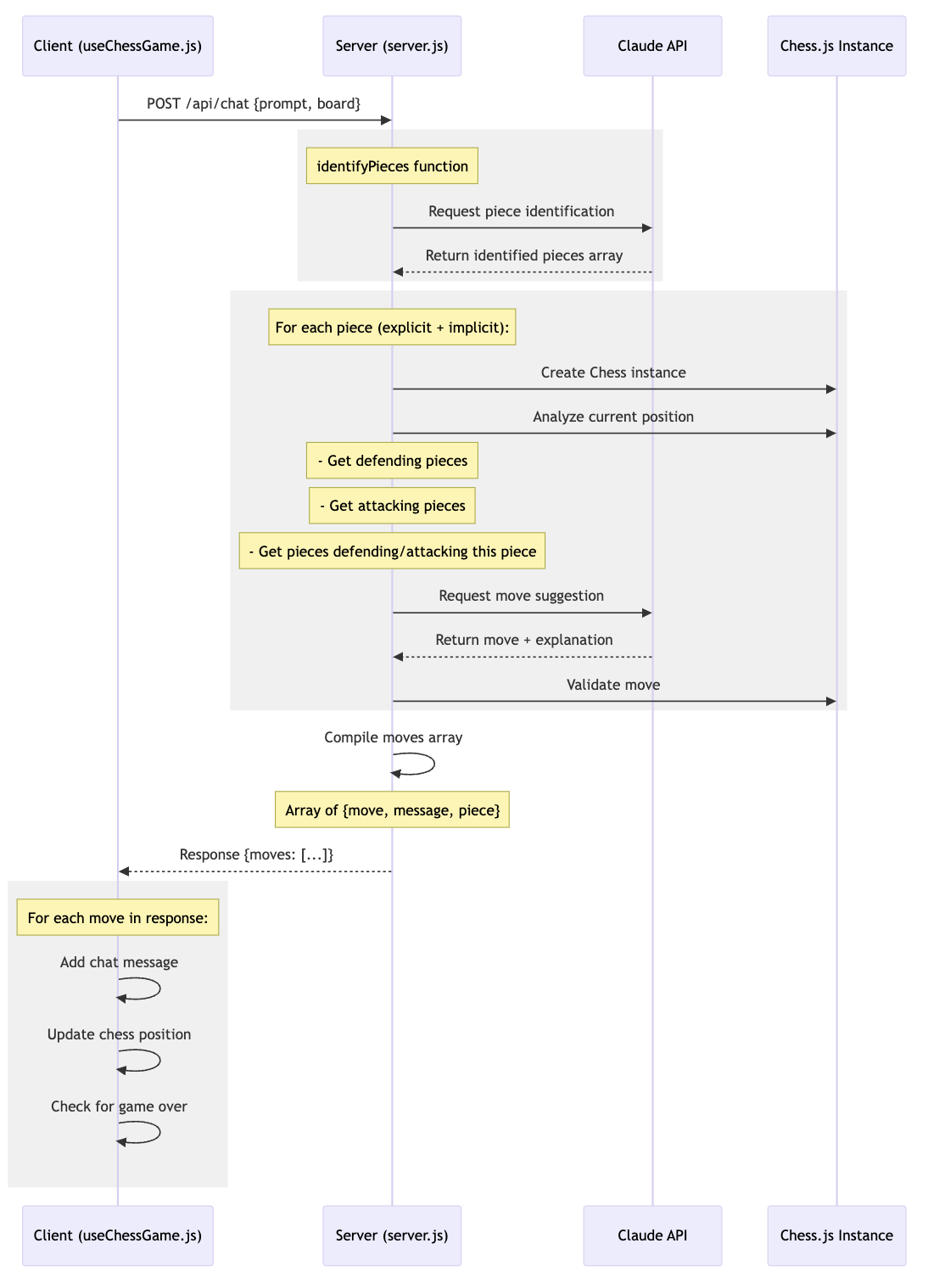
ok let's have the text boxes for location names actually be google maps auto complete. Here's some sample code from their website. ```[sample code]```
    Ok, let's add Google Places Autocomplete to our location inputs. We'll need to:

    1. First, update the Google Maps script tag in index.html to include the places library:
    ```html
    <script src="https://maps.googleapis.com/maps/api/js?key=YOUR_API_KEY&libraries=places"></script>
    ```

    2. Modify the location input in renderLocations() in app.js:
    ```javascript
    function renderLocations() {
        const locationList = document.getElementById('location-list');
        locationList.innerHTML = locations.map(location => `
            <div class="location-item">
                <input type="text"
                       class="location-input"
                       placeholder="Enter address"
                       value="${location.name}"
                       data-location-id="${location.id}">
                <input type="number"
                       min="1"
                       value="${location.passengerCount}"
                       onchange="updatePassengerCount('${location.id}', this.value)">
                <button onclick="deleteLocation('${location.id}')">Delete</button>
            </div>
        `).join('');

        // Initialize autocomplete for each location input
        document.querySelectorAll('.location-input').forEach(input => {
            const autocomplete = new google.maps.places.Autocomplete(input, {
                fields: ['formatted_address', 'geometry'],
                types: ['address']
            });

            autocomplete.addListener('place_changed', () => {
                const place = autocomplete.getPlace();
                if (place.formatted_address) {
                    const locationId = input.dataset.locationId;
                    updateLocationName(locationId, place.formatted_address);
                }
            });
        });
    }
    ```

    3. Update the updateLocationName function to handle the full address:
    ```javascript
    function updateLocationName(id, name) {
        const location = locations.find(l => l.id === id);
        if (location) {
            location.name = name;
            // Optionally store the formatted address for display
            location.formattedAddress = name;
        }
    }
    ```

    4. Add some CSS to style the autocomplete dropdown:
    ```css
    .location-input {
        width: 300px;  /* or whatever width works for your layout */
    }

    /* Style the Google Places Autocomplete dropdown */
    .pac-container {
        z-index: 1051;
        width: 300px;
        background-color: #fff;
        border: 1px solid #ccc;
        border-radius: 4px;
        box-shadow: 0 2px 6px rgba(0,0,0,0.3);
    }

    .pac-item {
        padding: 8px;
        cursor: pointer;
    }

    .pac-item:hover {
        background-color: #f5f5f5;
    }
    ```

    This will:
    1. Add autocomplete to each location input
    2. Use Google's Places service to suggest addresses
    3. Store the full formatted address when selected
    4. Style the autocomplete dropdown to match your UI

    The autocomplete will:
    - Show suggestions as the user types
    - Allow selection of exact addresses
    - Store the formatted address string
    - Work with the existing Google Maps distance matrix calculations

    Would you like me to:
    1. Add location validation
    2. Store latitude/longitude coordinates
    3. Add a map preview
    4. Something else?

    > Tokens: 11k sent, 660 received. Cost: $0.04 message, $0.40 session.
    > Edit the files? (Y)es/(N)o [Yes]: y

    I'll provide the SEARCH/REPLACE blocks for the changes we discussed:

    index.html
    ```python
    <<<<<<< SEARCH
        <script src="https://maps.googleapis.com/maps/api/js?key=YOUR_API_KEY"></script>
    =======
        <script src="https://maps.googleapis.com/maps/api/js?key=YOUR_API_KEY&libraries=places"></script>
    >>>>>>> REPLACE
    ```

    app.js
    ```python
    <<<<<<< SEARCH
    function renderLocations() {
        const locationList = document.getElementById('location-list');
        locationList.innerHTML = locations.map(location => `
            <div class="location-item">
                <input type="text"
                       placeholder="Location name"
                       value="${location.name}"
                       onchange="updateLocationName('${location.id}', this.value)">
                <input type="number"
                       min="1"
                       value="${location.passengerCount}"
                       onchange="updatePassengerCount('${location.id}', this.value)">
                <button onclick="deleteLocation('${location.id}')">Delete</button>
            <lt;/div>
        `).join('');
    }
    =======
    function renderLocations() {
        const locationList = document.getElementById('location-list');
        locationList.innerHTML = locations.map(location => `
            <lt;div class="location-item">
                <lt;input type="text"
                       class="location-input"
                       placeholder="Enter address"
                       value="${location.name}"
                       data-location-id="${location.id}">
                <lt;input type="number"
                       min="1"
                       value="${location.passengerCount}"
                       onchange="updatePassengerCount('${location.id}', this.value)">
                <lt;button onclick="deleteLocation('${location.id}')">Delete</button>
            <lt;/div>
        `).join('');

        // Initialize autocomplete for each location input
        document.querySelectorAll('.location-input').forEach(input => {
            const autocomplete = new google.maps.places.Autocomplete(input, {
                fields: ['formatted_address', 'geometry'],
                types: ['address']
            });

            autocomplete.addListener('place_changed', () => {
                const place = autocomplete.getPlace();
                if (place.formatted_address) {
                    const locationId = input.dataset.locationId;
                    updateLocationName(locationId, place.formatted_address);
                }
            });
        });
    }
    >>>>>>> REPLACE
    ```

    app.js
    ```python
    <<<<<<< SEARCH
    function updateLocationName(id, name) {
        const location = locations.find(l => l.id === id);
        if (location) location.name = name;
    }
    =======
    function updateLocationName(id, name) {
        const location = locations.find(l => l.id === id);
        if (location) {
            location.name = name;
            // Optionally store the formatted address for display
            location.formattedAddress = name;
        }
    }
    >>>>>>> REPLACE
    ```

    styles.css
    ```python
    <<<<<<< SEARCH
    input, select {
        margin: 0 5px;
        padding: 3px;
    }
    =======
    input, select {
        margin: 0 5px;
        padding: 3px;
    }

    .location-input {
        width: 300px;
    }

    /* Style the Google Places Autocomplete dropdown */
    .pac-container {
        z-index: 1051;
        width: 300px;
        background-color: #fff;
        border: 1px solid #ccc;
        border-radius: 4px;
        box-shadow: 0 2px 6px rgba(0,0,0,0.3);
    }

    .pac-item {
        padding: 8px;
        cursor: pointer;
    }

    .pac-item:hover {
        background-color: #f5f5f5;
    }
    >>>>>>> REPLACE
    ```

    > Tokens: 4.5k sent, 742 received. Cost: $0.02 message, $0.42 session.
    > Applied edit to app.js
    > Applied edit to index.html
    > Applied edit to styles.css
    > Commit 7150ee4 feat: Add Google Places Autocomplete to location inputs
    > You can use /undo to undo and discard each aider commit.
Make Big Changes
For ambiguous changes, ask for clarifying questions. This is good to do at the start of the project. Use interfaces and data structure changes as high leverage points. Changing an interface sucks in traditional dev, but in AI land it’s an easy way to concisely communicate sweeping changes.
ok we're making a simple app (probably static) that helps van drivers plan who is sitting in which van, based on the number of seats in each van, the locations that each person needs to get to, and the distance between locations. start by asking some clarifying questions
    I'll ask some key questions to help design this van planning system:

    1. About the vans:
    - Do all vans have the same number of seats or do they vary?
    - Are there any special seating requirements (e.g. wheelchair spaces)?
    - How many vans are typically being planned for at once?

    2. About the passengers:
    - Do passengers have preferred pickup/dropoff times?
    - Are there any passengers that need to be grouped together (like families)?
    - Do any passengers have priority over others?

    3. About the locations:
    - Are these fixed locations or can they be any address?
    - Will you need to integrate with a mapping service to calculate distances?
    - Are there multiple stops per route or just pickup and final destination?

    4. About the usage:
    - Who will be using this tool (dispatchers, drivers, passengers)?
    - Does it need to handle real-time updates?
    - Should it save/export the plans?
    - Does it need to optimize for anything specific (shortest total distance, fewest vans used, etc.)?

    5. Technical constraints:
    - Does this need to be a web app, desktop app, or mobile app?
    - Are there any specific technologies you'd like to use?
    - Does it need to integrate with any existing systems?

    This will help me suggest an appropriate architecture and approach for the solution.

    > Tokens: 187 sent, 269 received. Cost: $0.0046 message, $0.0046 session.
    > Edit the files? (Y)es/(N)o [Yes]: n
i think we want to change the format of the move received from the backend. rather than {from: e2, to: e4}, we should just send the fen notation
    To address this issue, we need to modify both the server-side and client-side code. Let's start with the server-side changes:

    server.js
    ```javascript
    <<<<<<< SEARCH
          try {
            const currentPosition = new Chess(board);
            const moveResult = currentPosition.move(move);

            if (moveResult) {
              result = {
                message: explanation,
                move: move.toLowerCase()
              };
            } else {
              throw new Error("Invalid move");
            }
          } catch (error) {
            console.error('Error processing move:', error);
            result = {
              message: "The suggested move is not valid. Let's try a different approach.",
              move: null
            };
          }
    =======
          try {
            const currentPosition = new Chess(board);
            const moveResult = currentPosition.move(move);

            if (moveResult) {
              result = {
                message: explanation,
                fen: currentPosition.fen()
              };
            } else {
              throw new Error("Invalid move");
            }
          } catch (error) {
            console.error('Error processing move:', error);
            result = {
              message: "The suggested move is not valid. Let's try a different approach.",
              fen: null
            };
          }
    >>>>>>> REPLACE
    ```

    Now, let's update the client-side code to handle the new response format:

    client/src/ChessGame.jsx
    ```javascript
    <<<<<<< SEARCH
          if (data.move) {
            console.log('Valid move received:', data.move);
            const from = data.move.slice(0, 2);
            const to = data.move.slice(2, 4);
            makeMove({ from, to });
          } else {
            console.log('No valid move in the response');
          }
    =======
          if (data.fen) {
            console.log('Valid move received, new FEN:', data.fen);
            setGame(new Chess(data.fen));
          } else {
            console.log('No valid move in the response');
          }
    >>>>>>> REPLACE
    ```

    We also need to update the `makeMove` function in `ChessGame.jsx`:

    client/src/ChessGame.jsx
    ```javascript
    <<<<<<< SEARCH
      const makeMove = useCallback((move) => {
        const gameCopy = new Chess(game.fen());
        const result = gameCopy.move(move);
        if (result) {
          setGame(gameCopy);

          if (isKingCaptured(gameCopy.fen())) {
            setGameOver(true);
            onOpen();
          }
        }
        return result;
      }, [game, onOpen]);
    =======
      const makeMove = useCallback((fen) => {
        const gameCopy = new Chess(fen);
        setGame(gameCopy);

        if (isKingCaptured(fen)) {
          setGameOver(true);
          onOpen();
        }
      }, [onOpen]);
    >>>>>>> REPLACE
    ```

    Finally, let's update the AI move generation part:

    client/src/ChessGame.jsx
    ```javascript
    <<<<<<< SEARCH
              const { message, move } = await generatePieceResponse(aiPrompt, aiPiece.type, aiPiece.square);
              addChatMessage(move ? `${aiPiece.type} at ${move.slice(0, 2)}` : `${aiPiece.type} at ${aiPiece.square}`, message);
    =======
              const { message, fen } = await generatePieceResponse(aiPrompt, aiPiece.type, aiPiece.square);
              if (fen) {
                const newGame = new Chess(fen);
                const lastMove = newGame.history().pop();
                addChatMessage(`${aiPiece.type} at ${lastMove.slice(0, 2)}`, message);
                makeMove(fen);
              } else {
                addChatMessage(`${aiPiece.type} at ${aiPiece.square}`, message);
              }
    >>>>>>> REPLACE
    ```

    These changes will update the application to use FEN notation for moves instead of the previous {from, to} format. The server now sends the full FEN of the board after the move, and the client updates its game state based on this FEN.

    > Tokens: 9.4k sent, 835 received. Cost: $0.04 message, $1.03 session.
    > Applied edit to client/src/ChessGame.jsx
    > Applied edit to server.js
    > Commit c8cbb8b feat: Use FEN notation for move responses
    > You can use /undo to undo and discard each aider commit.
Ask for a list of what needs to be done to accommodate the big change. If there’s a lot, ask for mocks and stubs first, then implement them individually.
we're going to migrate to python fastapi and jinja2 templates. first, list every file currently in the project and what it does. next, list where the functionality for each of those files will go in the new project structure. finally, do the migration.
    Let me break this down step by step.

    **Current Files and Their Functions:**

    1. `index.html`
    - Main frontend interface
    - Contains HTML structure and Google Maps integration
    - Loads styles and JavaScript

    2. `styles.css`
    - All frontend styling
    - Handles layout, colors, animations, and responsive design

    3. `app.js`
    - Core application logic
    - Handles state management
    - Google Maps integration
    - Route calculations
    - DOM manipulation
    - Local storage management

    4. `build.js`
    - Build script
    - Injects Google Maps API key
    - Creates dist folder
    - Copies files to dist

    5. `package.json` & `package-lock.json`
    - Node.js project configuration
    - Dependencies management

    6. `.gitignore`
    - Git ignore rules

    **New FastAPI/Jinja2 Structure:**

    ```
    project/
    ├── app/
    │   ├── __init__.py
    │   ├── main.py              # FastAPI application
    │   ├── config.py            # Configuration management
    │   ├── routes/
    │   │   └── web.py          # Web routes
    │   ├── services/
    │   │   ├── google_maps.py  # Google Maps integration
    │   │   └── routing.py      # Route calculation logic
    │   ├── static/
    │   │   ├── css/
    │   │   │   └── styles.css  # Same CSS
    │   │   └── js/
    │   │       └── main.js     # Frontend JavaScript (reduced)
    │   └── templates/
    │       ├── base.html       # Base template
    │       └── index.html      # Main page template
    ├── requirements.txt        # Python dependencies
    └── .env                   # Environment variables
    ```

    **Migration Plan:**

    1. Backend functionality from `app.js` moves to:
    - `routes/web.py` - HTTP endpoints
    - `services/google_maps.py` - Maps integration
    - `services/routing.py` - Route calculation

    2. Frontend:
    - `templates/index.html` - Jinja2 template version of current index.html
    - `static/js/main.js` - Simplified JavaScript (only UI handling)
    - `static/css/styles.css` - Same CSS file

    3. Configuration:
    - `.env` - Environment variables (including Google Maps API key)
    - `config.py` - Configuration management

    Would you like me to proceed with the actual migration? We should do it step by step, starting with setting up the basic FastAPI structure and then migrating each component.

    > Tokens: 6.7k sent, 530 received. Cost: $0.03 message, $0.07 session.
    > Add package-lock.json to the chat? (Y)es/(N)o/(D)on't ask again [Yes]: n
    > Edit the files? (Y)es/(N)o [Yes]: y

    Let's start by creating the basic FastAPI structure. I'll create the initial Python files and directory structure.

    app/__init__.py
    ```python
    <<<<<<< SEARCH
    =======
    from fastapi import FastAPI
    from fastapi.staticfiles import StaticFiles
    from fastapi.templating import Jinja2Templates

    app = FastAPI()
    app.mount("/static", StaticFiles(directory="app/static"), name="static")
    templates = Jinja2Templates(directory="app/templates")
    >>>>>>> REPLACE
    ```

    app/config.py
    ```python
    <<<<<<< SEARCH
    =======
    from pydantic_settings import BaseSettings

    class Settings(BaseSettings):
        google_maps_api_key: str

        class Config:
            env_file = ".env"

    settings = Settings()
    >>>>>>> REPLACE
    ```

    app/main.py
    ```python
    <<<<<<< SEARCH
    =======
    from fastapi import FastAPI
    from fastapi.middleware.cors import CORSMiddleware
    from app import app
    from app.routes import web

    app.include_router(web.router)

    if __name__ == "__main__":
        import uvicorn
        uvicorn.run(app, host="0.0.0.0", port=8000)
    >>>>>>> REPLACE
    ```

    app/routes/web.py
    ```python
    <<<<<<< SEARCH
    =======
    from fastapi import APIRouter, Request
    from app import templates
    from app.config import settings

    router = APIRouter()

    @router.get("/")
    async def index(request: Request):
        return templates.TemplateResponse(
            "index.html",
            {
                "request": request,
                "google_maps_api_key": settings.google_maps_api_key
            }
        )
    >>>>>>> REPLACE
    ```

    requirements.txt
    ```python
    <<<<<<< SEARCH
    =======
    fastapi==0.109.2
    uvicorn==0.27.1
    jinja2==3.1.3
    python-dotenv==1.0.1
    pydantic-settings==2.1.0
    >>>>>>> REPLACE
    ```

    This sets up the basic FastAPI structure. Would you like me to continue with:
    1. Moving the templates and static files
    2. Creating the Google Maps service
    3. Moving the routing logic to Python
    4. Updating the frontend JavaScript

    Which would you like me to tackle next?

    > Tokens: 8.6k sent, 450 received. Cost: $0.03 message, $0.11 session.
    > app/__init__.py
    > Create new file? (Y)es/(N)o [Yes]: y
    > app/config.py
    > Create new file? (Y)es/(N)o [Yes]: y
    > app/main.py
    > Create new file? (Y)es/(N)o [Yes]: y
    > app/routes/web.py
    > Create new file? (Y)es/(N)o [Yes]: y
    > requirements.txt
    > Create new file? (Y)es/(N)o [Yes]: y
    > Applied edit to requirements.txt
    > Applied edit to app/__init__.py
    > Applied edit to app/config.py
    > Applied edit to app/main.py
    > Applied edit to app/routes/web.py
    > Commit 479c70b feat: Set up initial FastAPI project structure with routing and configuration
    > You can use /undo to undo and discard each aider commit.
ok, rather than implement calculating drive times between locations using google maps, let's just mock that part out with fake data so we can add it later.
    Good idea! Let's add a simple mock distance/time matrix. We'll add this to app.js:

    ```javascript
    // Add this near the top of app.js with other data structures
    const MOCK_DRIVE_TIMES = {
        // Returns mock driving time in minutes between locations
        getDriveTime: (location1, location2) => {
            // Return a random time between 10-45 minutes
            return Math.floor(Math.random() * 35) + 10;
        }
    };

    // Add this function to app.js
    function getRouteTime(locationList) {
        let totalTime = 0;

        // Add up drive times between consecutive locations
        for (let i = 0; i < locationList.length - 1; i++) {
            totalTime += MOCK_DRIVE_TIMES.getDriveTime(locationList[i], locationList[i + 1]);
        }

        // Add 5 minutes loading/unloading time per location
        totalTime += locationList.length * 5;

        return totalTime;
    }
    ```

    This gives us:
    1. A mock driving time generator that returns random times between 10-45 minutes
    2. A helper function to calculate total route time including stops
    3. Later, we can replace MOCK_DRIVE_TIMES with real Google Maps API calls

    Would you like me to show how to use these in the route calculation logic?

    > Tokens: 3.7k sent, 277 received. Cost: $0.02 message, $0.12 session.
    > Edit the files? (Y)es/(N)o [Yes]: y

    I'll add those new functions to app.js using proper SEARCH/REPLACE blocks:

    app.js
    ```javascript
    <<<<<<< SEARCH
    let vans = [];
    let locations = [];
    =======
    let vans = [];
    let locations = [];

    const MOCK_DRIVE_TIMES = {
        // Returns mock driving time in minutes between locations
        getDriveTime: (location1, location2) => {
            // Return a random time between 10-45 minutes
            return Math.floor(Math.random() * 35) + 10;
        }
    };

    function getRouteTime(locationList) {
        let totalTime = 0;

        // Add up drive times between consecutive locations
        for (let i = 0; i < locationList.length - 1; i++) {
            totalTime += MOCK_DRIVE_TIMES.getDriveTime(locationList[i], locationList[i + 1]);
        }

        // Add 5 minutes loading/unloading time per location
        totalTime += locationList.length * 5;

        return totalTime;
    }
    >>>>>>> REPLACE
    ```

    Would you like me to show how to implement these in the route calculation logic next?

    > Tokens: 3.0k sent, 226 received. Cost: $0.01 message, $0.13 session.
    > Applied edit to app.js
    > Commit d14432e feat: Add mock drive times and route time calculation functions
    > You can use /undo to undo and discard each aider commit.
Gauge Difficulty
If you have no idea how to do something, ask “what are some different options to do X?” You can also ask how hard each option is to do. Make the change just to scope the problem (just like a spike in extreme programming) then immediately /undo it.
i kind of want to turn this into a webapp. immediate thoughts?
    Here are my immediate thoughts for turning this into a webapp:

    1. Framework Choice:
    ```python
    # FastAPI would be a great choice because:
    # - Already using async/await throughout codebase
    # - Easy to convert existing functions to endpoints
    # - Built-in API documentation
    # - Good WebSocket support if needed
    from fastapi import FastAPI, WebSocket
    ```

    2. Initial Architecture:
    ```
    romance/
    ├── backend/
    │   ├── api/           # FastAPI routes
    │   ├── models/        # Current dataclasses become Pydantic models
    │   └── services/      # Current business logic
    ├── frontend/          # New React/Vue frontend
    └── docker/           # Containerization
    ```

    3. Key Changes Needed:

    - Convert StateManager to a proper database:
    ```python
    # Using SQLAlchemy async
    class Book(Base):
        __tablename__ = "books"
        id = Column(Integer, primary_key=True)
        location = Column(JSON)  # Store Location dataclass as JSON
        characters = Column(JSON)
        beat_sheet = Column(JSON)
    ```

    - Convert command handlers to API endpoints:
    ```python
    @app.post("/api/location/generate")
    async def generate_location(book_id: int):
        # Current location command handler logic
        pass

    @app.post("/api/location/select")
    async def select_location(book_id: int, location_index: int):
        # Current location selection logic
        pass
    ```

    - Add user authentication:
    ```python
    from fastapi_users import FastAPIUsers
    ```

    4. Frontend Considerations:
    - Each state could be a different route/page
    - Use a state management solution (Redux/Vuex)
    - Progressive loading of AI-generated content
    - Real-time updates using WebSocket for long-running generations

    5. Immediate Next Steps:
    1. Set up FastAPI skeleton
    2. Convert one feature (like location) to API endpoints
    3. Create basic frontend to test the API
    4. Set up database
    5. Add authentication
    6. Gradually convert other features

    Would you like me to elaborate on any of these aspects or show a more detailed example of one of these components?

    > Tokens: 13k sent, 451 received. Cost: $0.04 message, $3.88 session.
[answering clarifying questions…] how hard would it be to integrate with google maps to calculate drive time? [more clarification]
    Thanks for the clarification. Here's a proposed solution:

    Architecture Proposal:
    1. Single-page web app using vanilla JavaScript (or simple React if preferred)
    2. Local Storage for data persistence
    3. Optional Google Maps Distance Matrix API integration (I'll explain both with and without)

    Core Data Structures:
    ```typescript
    interface Van {
      id: string;
      seatCount: number;
    }

    interface Location {
      id: string;
      name: string;
      passengerCount: number;
      coordinates?: {lat: number, lng: number}  // Optional for Maps integration
    }

    interface Route {
      vanId: string;
      stopOrder: string[];  // array of location IDs
      passengers: number;
    }
    ```

    Key Components:
    1. Data Input Section:
       - Van configuration (number of vans, seats per van)
       - Location input (name, number of passengers, optional address)
       - Simple form-based UI with ability to add/remove entries

    2. Route Planning:
       - Without Maps API: Manual distance input matrix between locations
       - With Maps API: Automatic calculation using Distance Matrix API
       - Algorithm to optimize van assignments based on:
         - Minimizing total drive time
         - Keeping passenger count under van capacity
         - Covering all locations

    3. Results Display:
       - Clear visual representation of each van's route
       - Passenger counts at each stop
       - Shareable format (copy to clipboard or simple export)

    Google Maps Integration (optional):
    - Would require API key (~$200/month for heavy usage, but free tier available)
    - Provides accurate drive times considering traffic
    - Adds autocomplete for addresses
    - Can show routes on map

    Would you like me to proceed with any particular aspect of this proposal? I can:
    1. Start with the basic data input UI
    2. Design the route optimization algorithm
    3. Set up the Google Maps integration
    4. Create the results display

    Let me know which direction you'd prefer to tackle first.

    > Tokens: 601 sent, 408 received. Cost: $0.0079 message, $0.01 session.
    > Edit the files? (Y)es/(N)o [Yes]: n

    #### /architect ok let's go ahead with the simplest MVP, starting with the data input UI.
When All Else Fails
My rule of thumb is that if I get more than 3 or 4 commits away from the last tag, I’m in too deep and it’s time to take a step back. If you’re running in circles, go back to the last tag with /git reset --hard. Use your learnings to do something different.
/git reset --hard v0.1.2
Sometimes this means using a library, sometimes it means switching libraries, sometimes it means ditching a library and writing it from scratch. In traditional dev, using a library is almost always better if it exists. The options are more evenly weighted in AI land, since implementing some simple functionality might be easier than integrating with a complex library. It’s also now much lower cost to switch to a new library that has similar functionality.
there's something wrong with the react board updating logic. is there a library or something we can use?
    You're right, there seems to be an issue with the board updating logic. A popular library for handling chess logic and board state in React applications is `react-chess`. Let's integrate this library to improve the chess game functionality.

    First, we need to install the `react-chess` library. Here's the command to do that:

    ```bash
    npm install react-chess
    ```

    Now, let's update the `ChessGame.jsx` file to use `react-chess`:

    client/src/ChessGame.jsx
    ```jsx
    <<<<<<< SEARCH
    import React, { useState, useEffect, useCallback } from 'react';
    import { ChakraProvider, Box, VStack, HStack, Grid, GridItem, Text, Button, Input, useDisclosure, Modal, ModalOverlay, ModalContent, ModalHeader, ModalFooter, ModalBody, ModalCloseButton } from "@chakra-ui/react";
    import './ChessGame.css';

    const initialBoard = 'rnbqkbnrpppppppp................................PPPPPPPPRNBQKBNR';

    const ChessGame = () => {
      const [board, setBoard] = useState(initialBoard);
      const [playerTurn, setPlayerTurn] = useState(true);
      const [gameOver, setGameOver] = useState(false);
      const [chatMessages, setChatMessages] = useState([]);
      const [currentMessage, setCurrentMessage] = useState('');
      const { isOpen, onOpen, onClose } = useDisclosure();

      useEffect(() => {
        if (!playerTurn && !gameOver) {
          setTimeout(makeAIMove, 500);
        }
      }, [playerTurn, gameOver]);

      useEffect(() => {
        console.log('Board state changed:', board);
      }, [board]);

      const makeMove = useCallback((startRow, startCol, endRow, endCol) => {
        setBoard(prevBoard => {
          const startIndex = startRow * 8 + startCol;
          const endIndex = endRow * 8 + endCol;
          const movingPiece = prevBoard[startIndex];
          return prevBoard.substring(0, startIndex) + '.' +
                 prevBoard.substring(startIndex + 1, endIndex) +
                 movingPiece +
                 prevBoard.substring(endIndex + 1);
        });
        setPlayerTurn(prevTurn => !prevTurn);

        // Check for game over condition (e.g., king captured)
        const endIndex = endRow * 8 + endCol;
        if (board[endIndex] && board[endIndex].toLowerCase() === 'k') {
          setGameOver(true);
          onOpen(); // Open the game over modal
        }
      }, [board, onOpen]);

      const makeAIMove = async () => {
        // AI move logic remains the same
        // ...

        setPlayerTurn(true);
      };

      const generateAIResponse = async (prompt) => {
        try {
          console.log('Sending request to server:', { prompt, board });
          const response = await fetch('/api/chat', {
            method: 'POST',
            headers: {
              'Content-Type': 'application/json',
            },
            body: JSON.stringify({ prompt, board }),
          });

          if (!response.ok) {
            throw new Error(`HTTP error! status: ${response.status}`);
          }

          const data = await response.json();
          console.log('Received response from server:', data);

          // If there's a valid move, make it
          if (data.move) {
            console.log('Valid move received:', data.move);
            const { startRow, startCol, endRow, endCol } = data.move;
            makeMove(startRow, startCol, endRow, endCol);
            console.log('Board state after makeMove:', board);
          } else {
            console.log('No valid move in the response');
          }

          return data;
        } catch (error) {
          console.error("Error calling backend API:", error);
          return { message: "Sorry, I encountered an error while generating a response.", move: null };
        }
      };

      const resetGame = () => {
        setBoard(initialBoard);
        setPlayerTurn(true);
        setGameOver(false);
        setChatMessages([]);
        onClose(); // Close the game over modal
      };

      const addChatMessage = (sender, message) => {
        setChatMessages(prevMessages => [...prevMessages, { sender, message }]);
      };

      const handleSendMessage = async () => {
        if (currentMessage.trim() !== '') {
          addChatMessage("You", currentMessage);

          const { message } = await generateAIResponse(currentMessage);
          addChatMessage("AI", message);

          setCurrentMessage('');
        }
      };

      return (

          <Box p={4}>
            <HStack spacing={8} alignItems="flex-start">

                <Text fontSize="2xl" fontWeight="bold" mb={4}>Chess Game Demo</Text>
                <Grid templateColumns="repeat(8, 1fr)" gap={1}>
                  {Array.from(board).map((piece, index) => (
                    <GridItem
                      key={index}
                      w="50px"
                      h="50px"
                      bg={(Math.floor(index / 8) + index % 8) % 2 === 0 ? "gray.200" : "gray.400"}
                      display="flex"
                      justifyContent="center"
                      alignItems="center"
                      fontSize="2xl"
                    >
                      {piece !== '.' ? piece : ''}
                    </GridItem>
                  ))}
                </Grid>
                <Text mt={4} fontSize="lg">
                  {gameOver ? "Game Over!" : (playerTurn ? "Your turn" : "AI's turn")}
                </Text>
                <Button colorScheme="blue" onClick={resetGame} mt={4}>
                  Reset Game
                </Button>


              <VStack width="300px" bg="gray.100" p={4} borderRadius="md" alignItems="stretch">
                <Text fontSize="xl" fontWeight="bold" mb={4}>Chat</Text>
                <Box height="300px" overflowY="auto" mb={4} bg="white" p={2} borderRadius="md">
                  {chatMessages.map((msg, index) => (
                    <Text key={index} mb={2}>
                      {msg.sender}: {msg.message}
                    </Text>
                  ))}
                </Box>

                  <Input
                    value={currentMessage}
                    onChange={(e) => setCurrentMessage(e.target.value)}
                    onKeyPress={(e) => {
                      if (e.key === 'Enter') {
                        handleSendMessage();
                      }
                    }}
                    placeholder="Type a command (e.g., @PawnE2, move forward)"
                  />
                  <Button onClick={handleSendMessage}>Send</Button>

              </VStack>
            </HStack>
          </Box>

          <Modal isOpen={isOpen} onClose={onClose}>


              Game Over!


                {playerTurn ? "AI wins!" : "You win!"}


                <Button colorScheme="blue" mr={3} onClick={resetGame}>
                  Play Again
                </Button>


          </Modal>

      );
    };

    export default ChessGame;
    =======
    import React, { useState, useEffect, useCallback } from 'react';
    import { ChakraProvider, Box, VStack, HStack, Text, Button, Input, useDisclosure, Modal, ModalOverlay, ModalContent, ModalHeader, ModalFooter, ModalBody, ModalCloseButton } from "@chakra-ui/react";
    import Chess from 'react-chess'
    import './ChessGame.css';

    const ChessGame = () => {
      const [game, setGame] = useState(new Chess());
      const [playerTurn, setPlayerTurn] = useState(true);
      const [gameOver, setGameOver] = useState(false);
      const [chatMessages, setChatMessages] = useState([]);
      const [currentMessage, setCurrentMessage] = useState('');
      const { isOpen, onOpen, onClose } = useDisclosure();

      useEffect(() => {
        if (!playerTurn && !gameOver) {
          setTimeout(makeAIMove, 500);
        }
      }, [playerTurn, gameOver]);

      const makeMove = useCallback((from, to) => {
        const move = game.move({ from, to, promotion: 'q' });
        if (move) {
          setGame(new Chess(game.fen()));
          setPlayerTurn(prevTurn => !prevTurn);

          if (game.game_over()) {
            setGameOver(true);
            onOpen();
          }
        }
      }, [game, onOpen]);

      const makeAIMove = async () => {
        // AI move logic remains the same
        // You'll need to adapt this to work with the new game state
        setPlayerTurn(true);
      };

      const generateAIResponse = async (prompt) => {
        try {
          console.log('Sending request to server:', { prompt, board: game.fen() });
          const response = await fetch('/api/chat', {
            method: 'POST',
            headers: {
              'Content-Type': 'application/json',
            },
            body: JSON.stringify({ prompt, board: game.fen() }),
          });

          if (!response.ok) {
            throw new Error(`HTTP error! status: ${response.status}`);
          }

          const data = await response.json();
          console.log('Received response from server:', data);

          if (data.move) {
            console.log('Valid move received:', data.move);
            const { startRow, startCol, endRow, endCol } = data.move;
            const from = String.fromCharCode(97 + startCol) + (8 - startRow);
            const to = String.fromCharCode(97 + endCol) + (8 - endRow);
            makeMove(from, to);
          } else {
            console.log('No valid move in the response');
          }

          return data;
        } catch (error) {
          console.error("Error calling backend API:", error);
          return { message: "Sorry, I encountered an error while generating a response.", move: null };
        }
      };

      const resetGame = () => {
        setGame(new Chess());
        setPlayerTurn(true);
        setGameOver(false);
        setChatMessages([]);
        onClose();
      };

      const addChatMessage = (sender, message) => {
        setChatMessages(prevMessages => [...prevMessages, { sender, message }]);
      };

      const handleSendMessage = async () => {
        if (currentMessage.trim() !== '') {
          addChatMessage("You", currentMessage);

          const { message } = await generateAIResponse(currentMessage);
          addChatMessage("AI", message);

          setCurrentMessage('');
        }
      };

      return (

          <Box p={4}>
            <HStack spacing={8} alignItems="flex-start">

                <Text fontSize="2xl" fontWeight="bold" mb={4}>Chess Game Demo</Text>

                  <Chess position={game.fen()} />

                <Text mt={4} fontSize="lg">
                  {gameOver ? "Game Over!" : (playerTurn ? "Your turn" : "AI's turn")}
                </Text>
                <Button colorScheme="blue" onClick={resetGame} mt={4}>
                  Reset Game
                </Button>


              <VStack width="300px" bg="gray.100" p={4} borderRadius="md" alignItems="stretch">
                <Text fontSize="xl" fontWeight="bold" mb={4}>Chat</Text>
                <Box height="300px" overflowY="auto" mb={4} bg="white" p={2} borderRadius="md">
                  {chatMessages.map((msg, index) => (
                    <Text key={index} mb={2}>
                      {msg.sender}: {msg.message}
                    </Text>
                  ))}
                </Box>

                  <Input
                    value={currentMessage}
                    onChange={(e) => setCurrentMessage(e.target.value)}
                    onKeyPress={(e) => {
                      if (e.key === 'Enter') {
                        handleSendMessage();
                      }
                    }}
                    placeholder="Type a command (e.g., @PawnE2, move forward)"
                  />
                  <Button onClick={handleSendMessage}>Send</Button>

              </VStack>
            </HStack>
          </Box>

          <Modal isOpen={isOpen} onClose={onClose}>


              Game Over!


                {playerTurn ? "AI wins!" : "You win!"}


                <Button colorScheme="blue" mr={3} onClick={resetGame}>
                  Play Again
                </Button>


          </Modal>

      );
    };

    export default ChessGame;
    >>>>>>> REPLACE
    ```

    Now, let's update the `server.js` file to work with the FEN notation that `react-chess` uses:

    server.js
    ```javascript
    <<<<<<< SEARCH
    function boardToString(board) {
      return Array(8).fill().map((_, i) =>
        board.slice(i * 8, (i + 1) * 8).split('').join(' ')
      ).join('\n');
    }
    =======
    function boardToString(fen) {
      const board = fen.split(' ')[0];
      return board.split('/').map(row =>
        row.split('').map(char =>
          isNaN(char) ? char : '.'.repeat(parseInt(char))
        ).join(' ')
      ).join('\n');
    }
    >>>>>>> REPLACE
    ```

    These changes will integrate the `react-chess` library into your project, which should resolve the issues with board updating logic. The `react-chess` library provides a more robust implementation of chess rules and board representation.

    Here are the key changes:

    1. We're now using the `Chess` object from `react-chess` to manage the game state.
    2. The board is now represented using FEN (Forsyth–Edwards Notation), which is a standard notation for describing chess positions.
    3. The `makeMove` function now uses the `move` method provided by the `Chess` object, which handles all the chess logic internally.
    4. The `Chess` component from `react-chess` is used to render the board, which provides a more visually appealing and interactive chess board.

    After making these changes, you'll need to install the `react-chess` package. Run this command in your project directory:

    ```bash
    npm install react-chess
    ```

    These changes should significantly improve the chess game functionality and resolve the issues with board updating logic.

    > Tokens: 5.2k sent, 3.2k received. Cost: $0.06 message, $0.06 session.
    > Applied edit to client/src/ChessGame.jsx
    > Applied edit to server.js
    > Commit e2935cf feat: Integrate react-chess library to improve chess game functionality
    > npm install react-chess
    > Run shell command? (Y)es/(N)o/(D)on't ask again [Yes]: y
    > Running npm install react-chess
    > Add command output to the chat? (Y)es/(N)o/(D)on't ask again [Yes]: n
    > You can use /undo to undo and discard each aider commit.
shadcn-ui is giving me a headache. can we use something easier to use?
    (this is not aider, but the point is that you can easily re-write an entire page to use a different UI framework)

    Certainly! I understand that shadcn/ui can be complex, especially if you're just getting started or working on a quick prototype. Let's switch to a simpler and more straightforward UI library. A good alternative that's easy to use and requires minimal setup is Chakra UI. It provides a set of accessible and customizable React components that are easy to use out of the box.

    Let's update our chess game demo to use Chakra UI instead. I'll modify the React component to use Chakra UI components.

    ```tsx
    import React, { useState, useEffect } from 'react';
    import { ChakraProvider, Box, VStack, HStack, Grid, GridItem, Text, Button, Input, useDisclosure, Modal, ModalOverlay, ModalContent, ModalHeader, ModalFooter, ModalBody, ModalCloseButton } from "@chakra-ui/react";

    const initialBoard = [
      ['r', 'n', 'b', 'q', 'k', 'b', 'n', 'r'],
      ['p', 'p', 'p', 'p', 'p', 'p', 'p', 'p'],
      Array(8).fill(null),
      Array(8).fill(null),
      Array(8).fill(null),
      Array(8).fill(null),
      ['P', 'P', 'P', 'P', 'P', 'P', 'P', 'P'],
      ['R', 'N', 'B', 'Q', 'K', 'B', 'N', 'R'],
    ];

    const ChessGame = () => {
      const [board, setBoard] = useState(initialBoard);
      const [selectedPiece, setSelectedPiece] = useState(null);
      const [playerTurn, setPlayerTurn] = useState(true);
      const [gameOver, setGameOver] = useState(false);
      const [chatMessages, setChatMessages] = useState([]);
      const [currentMessage, setCurrentMessage] = useState('');
      const { isOpen, onOpen, onClose } = useDisclosure();

      useEffect(() => {
        if (!playerTurn && !gameOver) {
          setTimeout(makeAIMove, 500);
        }
      }, [playerTurn, gameOver]);

      const isValidMove = (startRow, startCol, endRow, endCol) => {
        // This is a placeholder for move validation
        // In a real chess game, you'd implement proper move validation here
        return true;
      };

      const makeMove = (startRow, startCol, endRow, endCol) => {
        const newBoard = board.map(row => [...row]);
        newBoard[endRow][endCol] = newBoard[startRow][startCol];
        newBoard[startRow][startCol] = null;
        setBoard(newBoard);
        setPlayerTurn(!playerTurn);

        // Check for game over condition (e.g., king captured)
        if (newBoard[endRow][endCol].toLowerCase() === 'k') {
          setGameOver(true);
          onOpen(); // Open the game over modal
        }
      };

      const handleClick = (row, col) => {
        if (!playerTurn || gameOver) return;

        if (selectedPiece) {
          const [startRow, startCol] = selectedPiece;
          if (isValidMove(startRow, startCol, row, col)) {
            makeMove(startRow, startCol, row, col);
            setSelectedPiece(null);
          } else {
            setSelectedPiece(null);
          }
        } else if (board[row][col] && board[row][col].toUpperCase() === board[row][col]) {
          setSelectedPiece([row, col]);
        }
      };

      const makeAIMove = async () => {
        const availableMoves = [];
        for (let i = 0; i < 8; i++) {
          for (let j = 0; j < 8; j++) {
            if (board[i][j] && board[i][j].toLowerCase() === board[i][j]) {
              for (let x = 0; x < 8; x++) {
                for (let y = 0; y < 8; y++) {
                  if (isValidMove(i, j, x, y)) {
                    availableMoves.push([i, j, x, y]);
                  }
                }
              }
            }
          }
        }

        if (availableMoves.length > 0) {
          const [startRow, startCol, endRow, endCol] = availableMoves[Math.floor(Math.random() * availableMoves.length)];
          makeMove(startRow, startCol, endRow, endCol);

          // Generate AI response using backend API
          const aiResponse = await generateAIResponse("I've made my move. It's your turn now. What's your strategy?");
          addChatMessage("AI", aiResponse);
        } else {
          setGameOver(true);
          onOpen(); // Open the game over modal
        }
      };

      const generateAIResponse = async (prompt) => {
        try {
          const response = await fetch('/api/chat', {
            method: 'POST',
            headers: {
              'Content-Type': 'application/json',
            },
            body: JSON.stringify({ prompt }),
          });

          if (!response.ok) {
            throw new Error(`HTTP error! status: ${response.status}`);
          }

          const data = await response.json();
          return data.message;
        } catch (error) {
          console.error("Error calling backend API:", error);
          return "Sorry, I encountered an error while generating a response.";
        }
      };

      const resetGame = () => {
        setBoard(initialBoard);
        setSelectedPiece(null);
        setPlayerTurn(true);
        setGameOver(false);
        setChatMessages([]);
        onClose(); // Close the game over modal
      };

      const addChatMessage = (sender, message) => {
        setChatMessages(prevMessages => [...prevMessages, { sender, message }]);
      };

      const handleSendMessage = async () => {
        if (currentMessage.trim() !== '') {
          addChatMessage("You", currentMessage);
          const aiResponse = await generateAIResponse(currentMessage);
          addChatMessage("AI", aiResponse);
          setCurrentMessage('');
        }
      };

      return (
        <ChakraProvider>
          <Box p={4}>
            <HStack spacing={8} alignItems="flex-start">
              <VStack>
                <Text fontSize="2xl" fontWeight="bold" mb={4}>Chess Game Demo</Text>
                <Grid templateColumns="repeat(8, 1fr)" gap={1}>
                  {board.map((row, rowIndex) =>
                    row.map((piece, colIndex) => (
                      <GridItem
                        key={`${rowIndex}-${colIndex}`}
                        w="50px"
                        h="50px"
                        bg={(rowIndex + colIndex) % 2 === 0 ? "gray.200" : "gray.400"}
                        display="flex"
                        justifyContent="center"
                        alignItems="center"
                        fontSize="2xl"
                        onClick={() => handleClick(rowIndex, colIndex)}
                        border={selectedPiece && selectedPiece[0] === rowIndex && selectedPiece[1] === colIndex ? "2px solid blue" : "none"}
                        cursor="pointer"
                      >
                        {piece}
                      </GridItem>
                    ))
                  )}
                </Grid>
                <Text mt={4} fontSize="lg">
                  {gameOver ? "Game Over!" : (playerTurn ? "Your turn" : "AI's turn")}
                </Text>
                <Button colorScheme="blue" onClick={resetGame} mt={4}>
                  Reset Game
                </Button>
              </VStack>

              <VStack width="300px" bg="gray.100" p={4} borderRadius="md" alignItems="stretch">
                <Text fontSize="xl" fontWeight="bold" mb={4}>Chat</Text>
                <Box height="300px" overflowY="auto" mb={4} bg="white" p={2} borderRadius="md">
                  {chatMessages.map((msg, index) => (
                    <Text key={index} mb={2}>
                      <strong>{msg.sender}: </strong>{msg.message}
                    </Text>
                  ))}
                </Box>
                <HStack>
                  <Input
                    value={currentMessage}
                    onChange={(e) => setCurrentMessage(e.target.value)}
                    placeholder="Type a message..."
                  />
                  <Button onClick={handleSendMessage}>Send</Button>
                </HStack>
              </VStack>
            </HStack>
          </Box>

          <Modal isOpen={isOpen} onClose={onClose}>
            <ModalOverlay />
            <ModalContent>
              <ModalHeader>Game Over!</ModalHeader>
              <ModalCloseButton />
              <ModalBody>
                {playerTurn ? "AI wins!" : "You win!"}
              </ModalBody>
              <ModalFooter>
                <Button colorScheme="blue" mr={3} onClick={resetGame}>
                  Play Again
                </Button>
              </ModalFooter>
            </ModalContent>
          </Modal>
        </ChakraProvider>
      );
    };

    export default ChessGame;

    ```

    This updated version of the chess game demo uses Chakra UI components instead of shadcn/ui. Here are the key changes:

    1. Imported necessary components from Chakra UI.
    2. Wrapped the entire component with `ChakraProvider` for Chakra UI theming.
    3. Replaced custom styled divs with Chakra UI's `Box`, `VStack`, `HStack`, and `Grid` components.
    4. Used Chakra UI's `Button`, `Input`, and `Text` components for various UI elements.
    5. Implemented the game over modal using Chakra UI's `Modal` component.

    To use this updated version:

    1. Install Chakra UI in your project:
       ```
       npm install @chakra-ui/react @emotion/react @emotion/styled framer-motion
       ```

    2. Replace the content of your `ChessGame.jsx` file with the code from this artifact.

    3. In your `App.js`, make sure to import and use the `ChessGame` component:

       ```jsx
       import React from 'react';
       import ChessGame from './ChessGame';

       function App() {
         return (
           <div className="App">
             <ChessGame />
           </div>
         );
       }

       export default App;
       ```

    This version should be easier to work with as Chakra UI provides a more straightforward API and requires less configuration than shadcn/ui. The game logic remains the same, but the UI components and styling have been updated to use Chakra UI.

    Remember to keep your backend (`server.js`) as it was, as we've only made changes to the frontend React component.
Clean Up The Code
If the AI is constantly making mistakes, clean up the code. Code hygiene still matters, even if you can’t see the code. Ask to see the relevant code. Ask leading questions about how or why things are the way they are, often so you can delete unnecessary parameters etc. Ask for refactors to make code modular, moving code to different files that you can /drop.
/ask show me the character selection logic to review, something's not quite right (…) /ask show me the whole while loop
    Here's the relevant character selection logic from `characters.py`:

    ```python
            try:
                # Handle both single numbers and space-separated numbers
                if ' ' in choice:
                    indices = [int(x)-1 for x in choice.split()]
                else:
                    indices = [int(choice)-1]

                selected = [characters[i] for i in indices if 0 <= i < len(characters)]
                if selected:
                    app_state.characters.characters.extend(selected)
                    # Remove selected characters from the list
                    characters = [char for i, char in enumerate(characters) if i not in indices]
                    if not characters:  # If no characters left in list
                        print("\nAll characters selected from this list. Generating new possibilities...")
                    continue  # Stay in the loop instead
            except (ValueError, IndexError):
                # If the input isn't 'quit' and isn't valid numbers, treat it as feedback
                # Format the current characters as they would appear in the original format
                current_chars_text = "\n".join(f"{i+1}. Name: {char.name}\n   Gender: {char.gender}\n   Occupation: {char.occupation}"
                                             for i, char in enumerate(characters))
                messages.extend([
                    {"role": "assistant", "content": f"Here are 6 characters as requested:\n\n{current_chars_text}"},
                    {"role": "user", "content": choice}
                ])
                continue
    ```

    I see a potential issue: when we remove selected characters from the list, we're doing:
    ```python
    characters = [char for i, char in enumerate(characters) if i not in indices]
    ```

    But this could cause problems because:
    1. The indices the user entered were based on the displayed numbers (1-based)
    2. After removing characters, the remaining characters' indices shift
    3. If someone enters "1 3", after removing character 1, character 3 is now at index 2

    We should probably:
    1. Sort the indices in reverse order so we remove from highest to lowest
    2. Or collect all the characters to remove first, then remove them all at once
    3. Or use a different data structure that maintains the original indices during removal

    Would you like me to propose a fix?

    > Tokens: 23k sent, 478 received. Cost: $0.08 message, $2.33 session.

    #### /ask show me the whole while loop

    #### show me the whole while loop

    Here's the complete while loop from `characters.py`:

    ```python
        while True:
            print("\nGenerating character possibilities...")
            characters = await process_character_text('\n'.join(
                await lm.gen_messages(messages, postprocess=lm.markdown_to_list)
            ))

            print('\nPOSSIBILITIES:')
            for idx, char in enumerate(characters, 1):
                print(f"{idx}. {char}")

            print("\nTo select characters, enter their numbers (space-separated)")
            print("Enter any text to guide the next generation")
            print("Or enter 'quit' to return to main menu")

            choice = input('(select) > ').strip()

            if choice.lower() == 'quit':
                return True

            try:
                # Handle both single numbers and space-separated numbers
                if ' ' in choice:
                    indices = [int(x)-1 for x in choice.split()]
                else:
                    indices = [int(choice)-1]

                selected = [characters[i] for i in indices if 0 <= i < len(characters)]
                if selected:
                    app_state.characters.characters.extend(selected)
                    # Remove selected characters from the list
                    characters = [char for i, char in enumerate(characters) if i not in indices]
                    if not characters:  # If no characters left in list
                        print("\nAll characters selected from this list. Generating new possibilities...")
                    continue  # Stay in the loop instead
            except (ValueError, IndexError):
                # If the input isn't 'quit' and isn't valid numbers, treat it as feedback
                # Format the current characters as they would appear in the original format
                current_chars_text = "\n".join(f"{i+1}. Name: {char.name}\n   Gender: {char.gender}\n   Occupation: {char.occupation}"
                                             for i, char in enumerate(characters))
                messages.extend([
                    {"role": "assistant", "content": f"Here are 6 characters as requested:\n\n{current_chars_text}"},
                    {"role": "user", "content": choice}
                ])
                continue
    ```

    Now I see another issue: we're regenerating the character list at the start of every loop iteration, even when we just want to show the same list minus the selected characters. We should only generate new characters when:
    1. The list is empty after selections
    2. The user provides feedback for new generation

    Let me propose a restructured version of this loop that fixes both issues. Would you like to see that?

    > Tokens: 24k sent, 535 received. Cost: $0.08 message, $2.41 session.
wait why do we even have the `STATE_TRANSITIONS` dict if we don't have a back command anymore
    You're right! Looking at `main.py`, we have the `BackCommand` class and its `STATE_TRANSITIONS` dictionary, but there's no way to actually use it since there's no 'back' command in the `COMMANDS` dictionary in `CommandFactory`.

    We can safely remove:
    1. The entire `BackCommand` class:
    ```python
    class BackCommand(Command):
        STATE_TRANSITIONS = {
            AppState.LOCATIONS: AppState.MAIN_MENU,  # Changed from LOCATION
            AppState.CHARACTERS: AppState.MAIN_MENU,
            AppState.BEATS: AppState.MAIN_MENU,
        }

        async def execute(self, state) -> bool:
            if state.state in self.STATE_TRANSITIONS:
                state.state = self.STATE_TRANSITIONS[state.state]
                return True
            return False
    ```

    2. And its import if it exists anywhere.

    The state transitions are now handled directly through the global commands (locations, characters, beats) which are always available, making the back command and its state transition map unnecessary.

    > Tokens: 34k sent, 209 received. Cost: $0.10 message, $5.46 session.
    > Edit the files? (Y)es/(N)o [Yes]: y

    I'll create a SEARCH/REPLACE block to remove the BackCommand class from main.py:

    main.py
    ```python
    <<<<<<< SEARCH
    class BackCommand(Command):
        STATE_TRANSITIONS = {
            AppState.LOCATIONS: AppState.MAIN_MENU,  # Changed from LOCATION
            AppState.CHARACTERS: AppState.MAIN_MENU,
            AppState.BEATS: AppState.MAIN_MENU,
        }

        async def execute(self, state) -> bool:
            if state.state in self.STATE_TRANSITIONS:
                state.state = self.STATE_TRANSITIONS[state.state]
                return True
            return False

    =======
    >>>>>>> REPLACE
    ```

    This removes the unused BackCommand class while keeping the rest of the file intact. The state transitions are indeed already handled by the global commands as you noted.

    > Tokens: 11k sent, 154 received. Cost: $0.03 message, $5.50 session.
    > Applied edit to main.py
    > Commit fe48864 refactor: Remove unused BackCommand class and state transitions
    > You can use /undo to undo and discard each aider commit.
ok, you're having reasoning errors because this chunk of code is too big. start by refactoring it into different cases with helper functions.
    You're right. Let's break this down into clear cases with helper functions. Here's how we could restructure it:

    ```python
    async def generate_characters(messages):
        """Generate and process a new list of characters from LM"""
        print("\nGenerating character possibilities...")
        characters = await process_character_text('\n'.join(
            await lm.gen_messages(messages, postprocess=lm.markdown_to_list)
        ))
        return characters

    def display_characters(characters):
        """Display the current list of character possibilities"""
        print('\nPOSSIBILITIES:')
        for idx, char in enumerate(characters, 1):
            print(f"{idx}. {char}")

        print("\nTo select characters, enter their numbers (space-separated)")
        print("Enter any text to guide the next generation")
        print("Or enter 'quit' to return to main menu")

    def handle_character_selection(choice, characters):
        """Process character selection input, return (selected_chars, remaining_chars)"""
        if ' ' in choice:
            indices = [int(x)-1 for x in choice.split()]
        else:
            indices = [int(choice)-1]

        selected = [characters[i] for i in indices if 0 <= i < len(characters)]
        remaining = [char for i, char in enumerate(characters) if i not in indices]
        return selected, remaining

    def add_feedback_to_messages(messages, characters, feedback):
        """Add user feedback and current characters to message history"""
        current_chars_text = "\n".join(
            f"{i+1}. Name: {char.name}\n   Gender: {char.gender}\n   Occupation: {char.occupation}"
            for i, char in enumerate(characters)
        )
        messages.extend([
            {"role": "assistant", "content": f"Here are 6 characters as requested:\n\n{current_chars_text}"},
            {"role": "user", "content": feedback}
        ])

    async def handle_character_command(command, app_state):
        parts = command.split(maxsplit=1)
        cmd = parts[0].lower()
        feedback = parts[1] if len(parts) > 1 else None

        if cmd != 'more':
            return False

        messages = [
            {"role": "user", "content": characters_prompt.format(
                location=app_state.location)}
        ]

        if feedback:
            messages.extend([
                {"role": "assistant", "content": "Here are 6 characters as requested:"},
                {"role": "user", "content": feedback}
            ])

        characters = await generate_characters(messages)

        while True:
            display_characters(characters)
            choice = input('(select) > ').strip()

            if choice.lower() == 'quit':
                return True

            try:
                selected, characters = handle_character_selection(choice, characters)
                if selected:
                    app_state.characters.characters.extend(selected)
                    if not characters:
                        print("\nAll characters selected from this list. Generating new possibilities...")
                        characters = await generate_characters(messages)
                continue
            except (ValueError, IndexError):
                add_feedback_to_messages(messages, characters, choice)
                characters = await generate_characters(messages)
                continue

        return False
    ```

    Now we have clear, separate functions for each operation:
    1. `generate_characters`: Handles character generation
    2. `display_characters`: Handles UI display
    3. `handle_character_selection`: Processes selection input
    4. `add_feedback_to_messages`: Handles feedback addition to message history

    This makes the logic easier to follow and debug. Each function has a single responsibility and we can test them independently.

    Would you like me to explain any particular part in more detail?

    > Tokens: 24k sent, 763 received. Cost: $0.08 message, $2.49 session.
    > Edit the files? (Y)es/(N)o [Yes]: y

    I'll convert the proposed changes into proper *SEARCH/REPLACE blocks*. We'll break this into multiple blocks to make it clearer:

    characters.py
    ```python
    <<<<<<< SEARCH
    async def handle_character_command(command, app_state):
        parts = command.split(maxsplit=1)
        cmd = parts[0].lower()
        feedback = parts[1] if len(parts) > 1 else None

        if cmd != 'more':
            return False

        messages = [
            {"role": "user", "content": characters_prompt.format(
                location=app_state.location)}
        ]

        if feedback:
            messages.extend([
                {"role": "assistant", "content": "Here are 6 characters as requested:"},
                {"role": "user", "content": feedback}
            ])

        while True:
            print("\nGenerating character possibilities...")
            characters = await process_character_text('\n'.join(
                await lm.gen_messages(messages, postprocess=lm.markdown_to_list)
            ))

            print('\nPOSSIBILITIES:')
            for idx, char in enumerate(characters, 1):
                print(f"{idx}. {char}")

            print("\nTo select characters, enter their numbers (space-separated)")
            print("Enter any text to guide the next generation")
            print("Or enter 'quit' to return to main menu")

            choice = input('(select) > ').strip()

            if choice.lower() == 'quit':
                return True

            try:
                indices = [int(x)-1 for x in choice.split()]
                selected = [characters[i] for i in indices if 0 <= i < len(characters)]
                if selected:
                    app_state.characters.characters.extend(selected)
                    # Remove selected characters from the list
                    characters = [char for i, char in enumerate(characters) if i not in indices]
                    if not characters:  # If no characters left in list
                        print("\nAll characters selected from this list. Generating new possibilities...")
                    continue  # Stay in the loop instead
            except (ValueError, IndexError):
                # If the input isn't 'quit' and isn't valid numbers, treat it as feedback
                # Format the current characters as they would appear in the original format
                current_chars_text = "\n".join(f"{i+1}. Name: {char.name}\n   Gender: {char.gender}\n   Occupation: {char.occupation}"
                                             for i, char in enumerate(characters))
                messages.extend([
                    {"role": "assistant", "content": f"Here are 6 characters as requested:\n\n{current_chars_text}"},
                    {"role": "user", "content": choice}
                ])
                continue

        return False
    =======
    async def generate_characters(messages):
        """Generate and process a new list of characters from LM"""
        print("\nGenerating character possibilities...")
        characters = await process_character_text('\n'.join(
            await lm.gen_messages(messages, postprocess=lm.markdown_to_list)
        ))
        return characters

    def display_characters(characters):
        """Display the current list of character possibilities"""
        print('\nPOSSIBILITIES:')
        for idx, char in enumerate(characters, 1):
            print(f"{idx}. {char}")

        print("\nTo select characters, enter their numbers (space-separated)")
        print("Enter any text to guide the next generation")
        print("Or enter 'quit' to return to main menu")

    def handle_character_selection(choice, characters):
        """Process character selection input, return (selected_chars, remaining_chars)"""
        if ' ' in choice:
            indices = [int(x)-1 for x in choice.split()]
        else:
            indices = [int(choice)-1]

        selected = [characters[i] for i in indices if 0 <= i < len(characters)]
        remaining = [char for i, char in enumerate(characters) if i not in indices]
        return selected, remaining

    def add_feedback_to_messages(messages, characters, feedback):
        """Add user feedback and current characters to message history"""
        current_chars_text = "\n".join(
            f"{i+1}. Name: {char.name}\n   Gender: {char.gender}\n   Occupation: {char.occupation}"
            for i, char in enumerate(characters)
        )
        messages.extend([
            {"role": "assistant", "content": f"Here are 6 characters as requested:\n\n{current_chars_text}"},
            {"role": "user", "content": feedback}
        ])

    async def handle_character_command(command, app_state):
        parts = command.split(maxsplit=1)
        cmd = parts[0].lower()
        feedback = parts[1] if len(parts) > 1 else None

        if cmd != 'more':
            return False

        messages = [
            {"role": "user", "content": characters_prompt.format(
                location=app_state.location)}
        ]

        if feedback:
            messages.extend([
                {"role": "assistant", "content": "Here are 6 characters as requested:"},
                {"role": "user", "content": feedback}
            ])

        characters = await generate_characters(messages)

        while True:
            display_characters(characters)
            choice = input('(select) > ').strip()

            if choice.lower() == 'quit':
                return True

            try:
                selected, characters = handle_character_selection(choice, characters)
                if selected:
                    app_state.characters.characters.extend(selected)
                    if not characters:
                        print("\nAll characters selected from this list. Generating new possibilities...")
                        characters = await generate_characters(messages)
                continue
            except (ValueError, IndexError):
                add_feedback_to_messages(messages, characters, choice)
                characters = await generate_characters(messages)
                continue

        return False
    >>>>>>> REPLACE
    ```

    This change:
    1. Extracts helper functions with clear responsibilities
    2. Simplifies the main command handler logic
    3. Makes the code more testable and maintainable
    4. Improves error handling for single number selections
    5. Keeps the same functionality but with cleaner organization

    > Tokens: 12k sent, 1.3k received. Cost: $0.06 message, $2.55 session.
If a file or a function is giving you a lot of problems, just delete it. Unlike in traditional dev, it’s much easier for the AI to do a full rewrite rather than fixing all the weird edges. This is especially true if you have a similar file already. Make X like Y, but with Z.
let's delete the beat_sheet mode everywhere it's defined.
    I'll help you remove the beat sheet functionality. Here are the changes needed:

    1. Delete `beat_sheet.py` entirely.

    2. In `command_handlers.py`, remove:
    - The `BeatsCommandHandler` class
    - The import `from beat_sheet import beats_status, handle_beats_command`

    3. In `main.py`, make these changes:

    ```python
    # Remove these imports
    from beat_sheet import BeatSheet, beats_status, handle_beats_command

    # In the AppState class, remove:
        BEATS = "BEATS"

    # In Plot class, remove:
        beat_sheet: BeatSheet

    # In StateManager class, remove:
        @property
        def beat_sheet(self): return self.book.plot.beat_sheet

    # In CommandFactory COMMANDS dict, remove:
        'beats': lambda: StateCommand(AppState.BEATS),

    # In Application class:
        def __init__(self, book_num):
            load_history()
            self.state_manager = StateManager(book_num)
            # Change this line:
            self.state_manager.state = AppState.MAIN_MENU  # or AppState.LOCATIONS
            self.command_handlers = {
                AppState.LOCATIONS: LocationCommandHandler(),
                AppState.CHARACTERS: CharactersCommandHandler(),
            }
            self.global_commands = {
                "undo": "Revert to last save",
                "debug, debugoff": "Enable / disable debug logging",
                "locations, characters": "Configure story location / characters",
                # Remove the "beats" line:
                # "beats": "Return to beat editing"
            }
    ```

    4. When initializing a new book in `StateManager`, modify:
    ```python
    self.book = Book(plot=Plot(location=[], characters=[]))  # Remove beat_sheet=BeatSheet()
    ```

    These changes will completely remove the beat sheet functionality from the codebase. The application will now focus only on locations and characters.

    > Tokens: 6.6k sent, 390 received. Cost: $0.03 message, $0.03 session.
    > Edit the files? (Y)es/(N)o [Yes]: y

    I'll help convert those changes into proper SEARCH/REPLACE blocks. First, let's handle the command_handlers.py changes:

    command_handlers.py
    ```python
    <<<<<<< SEARCH
    from beat_sheet import beats_status, handle_beats_command
    =======
    >>>>>>> REPLACE
    ```

    command_handlers.py
    ```python
    <<<<<<< SEARCH
    class BeatsCommandHandler(StateCommandHandler):
        def get_commands(self) -> dict[str, str]:
            return {
                "rewrite": "Regenerate the current beat",
                "edit": "Edit the beat sheet in an editor",
                "goto N": "Switch to beat number N",
                "next, prev": "Go to next / prev beat",
                "loc, chars, prompt": "Set location / characters / prompt for current beat"
            }

        async def handle_command(self, command: str, state) -> bool:
            return await handle_beats_command(command, state)

        def get_prompt(self) -> str:
            return "(beats) > "

        def print_status(self, state):
            beats_status(state)

    =======
    >>>>>>> REPLACE
    ```

    main.py
    ```python
    <<<<<<< SEARCH
    from beat_sheet import BeatSheet, beats_status, handle_beats_command
    =======
    >>>>>>> REPLACE
    ```

    main.py
    ```python
    <<<<<<< SEARCH
        MAIN_MENU = "MAIN_MENU"
        LOCATIONS = "LOCATIONS"  # Changed from LOCATION
        CHARACTERS = "CHARACTERS"
        BEATS = "BEATS"
    =======
        MAIN_MENU = "MAIN_MENU"
        LOCATIONS = "LOCATIONS"  # Changed from LOCATION
        CHARACTERS = "CHARACTERS"
    >>>>>>> REPLACE
    ```

    main.py
    ```python
    <<<<<<< SEARCH
        location: list[LocationEntry]
        characters: list[Character]
        beat_sheet: BeatSheet
    =======
        location: list[LocationEntry]
        characters: list[Character]
    >>>>>>> REPLACE
    ```

    main.py
    ```python
    <<<<<<< SEARCH
        @property
        def beat_sheet(self): return self.book.plot.beat_sheet
        @property
        def location(self): return self.book.plot.location
        @property
        def characters(self): return self.book.plot.characters
    =======
        @property
        def location(self): return self.book.plot.location
        @property
        def characters(self): return self.book.plot.characters
    >>>>>>> REPLACE
    ```

    main.py
    ```python
    <<<<<<< SEARCH
            'locations': lambda: StateCommand(AppState.LOCATIONS),  # Changed from LOCATION
            'characters': lambda: StateCommand(AppState.CHARACTERS),
            'beats': lambda: StateCommand(AppState.BEATS),
            'undo': UndoCommand,
    =======
            'locations': lambda: StateCommand(AppState.LOCATIONS),  # Changed from LOCATION
            'characters': lambda: StateCommand(AppState.CHARACTERS),
            'undo': UndoCommand,
    >>>>>>> REPLACE
    ```

    main.py
    ```python
    <<<<<<< SEARCH
            self.state_manager.state = AppState.BEATS  # Start in BEATS state instead of MAIN_MENU
    =======
            self.state_manager.state = AppState.MAIN_MENU
    >>>>>>> REPLACE
    ```

    main.py
    ```python
    <<<<<<< SEARCH
                AppState.LOCATIONS: LocationCommandHandler(),  # Changed from LOCATION
                AppState.BEATS: BeatsCommandHandler(),
                AppState.CHARACTERS: CharactersCommandHandler(),
    =======
                AppState.LOCATIONS: LocationCommandHandler(),  # Changed from LOCATION
                AppState.CHARACTERS: CharactersCommandHandler(),
    >>>>>>> REPLACE
    ```

    main.py
    ```python
    <<<<<<< SEARCH
                "locations, characters": "Configure story location / characters",
                "beats": "Return to beat editing"
    =======
                "locations, characters": "Configure story location / characters"
    >>>>>>> REPLACE
    ```

    main.py
    ```python
    <<<<<<< SEARCH
                self.book = Book(plot=Plot(location=[], characters=[], beat_sheet=BeatSheet()))
    =======
                self.book = Book(plot=Plot(location=[], characters=[]))
    >>>>>>> REPLACE
    ```

    And finally, we need to delete beat_sheet.py entirely. Since it was added to the chat, we should use a shell command:

    ```bash
    rm beat_sheet.py
    ```

    > Tokens: 8.2k sent, 852 received. Cost: $0.04 message, $0.06 session.
    > Applied edit to command_handlers.py
    > Applied edit to main.py
    > Commit 93fa495 refactor: Remove beat sheet functionality from the application
    > You can use /undo to undo and discard each aider commit.
let's add a beat mode. it's similar to characters, except before we generate beat options, the user needs to select not only a location, but characters and a writing prompt.
    I'll help you add the beat mode. We'll need to:

    1. Create a new `beats.py` file
    2. Add beat handling to `command_handlers.py`
    3. Update `main.py` to include the new beat mode

    First, let's create `beats.py`:

    ```python
    import logging
    from dataclasses import dataclass
    from typing import List

    import lm
    from selection import SelectionSystem

    @dataclass
    class Beat:
        description: str

        def __str__(self):
            return self.description

    async def process_beat_text(text):
        logging.debug(f"\nProcessing beat text:\n{text}")
        beats = []

        for line in text.strip().split('\n'):
            line = line.strip()
            if not line:
                continue

            logging.debug(f"Processing line: {line}")
            # Remove numbering if present
            if line[0].isdigit() and '. ' in line:
                line = line.split('. ', 1)[1]

            beats.append(Beat(description=line))

        logging.debug(f"Final beats list: {beats}")
        return beats

    def format_beats_history(beats: List[Beat]) -> str:
        return "\n".join(f"{i+1}. {beat}" for i, beat in enumerate(beats))

    beats_prompt = """\
    LOCATION:
    \"\"\"
    {location}
    \"\"\"

    CHARACTERS:
    \"\"\"
    {characters}
    \"\"\"

    WRITING PROMPT:
    \"\"\"
    {writing_prompt}
    \"\"\"

    Generate 5 possible story beats or scenes involving these characters in this location. Each beat should be a single sentence that captures a key moment or interaction.

    Rules:
    - One beat per line
    - Each beat should be specific and vivid
    - Focus on character interactions and conflicts
    - Incorporate the location meaningfully
    - Consider the writing prompt's theme

    Example format:
    Sarah confronts John in the abandoned lighthouse about his stolen research
    """

    BEAT_WRITING_PROMPTS = {
        "Conflict": "Focus on moments of tension and confrontation",
        "Romance": "Emphasize romantic or emotional connections",
        "Mystery": "Create beats that build intrigue or reveal secrets",
        "Action": "Highlight physical challenges or dramatic events"
    }

    beat_system = SelectionSystem(
        prompt=beats_prompt,
        parse_response=process_beat_text,
        format_for_history=format_beats_history,
        writing_prompts=BEAT_WRITING_PROMPTS
    )

    async def handle_beat_command(command, app_state):
        if command.startswith('more'):
            if not app_state.location:
                print("\nNo locations selected yet. Please add at least one location first.")
                return False

            if not app_state.characters:
                print("\nNo characters selected yet. Please add characters first.")
                return False

            print("\nAvailable locations:")
            for i, loc in enumerate(app_state.location, 1):
                print(f"{i}. {loc}")
            loc_input = input("\nSelect a location number: ")
            try:
                loc_index = int(loc_input) - 1
                if not (0 <= loc_index < len(app_state.location)):
                    print("Invalid location number")
                    return False
            except (ValueError, IndexError):
                print("Invalid location selection")
                return False

            print("\nAvailable characters:")
            for i, char in enumerate(app_state.characters, 1):
                print(f"{i}. {char}")
            char_input = input("\nSelect character numbers (space-separated): ")
            try:
                char_indices = [int(x)-1 for x in char_input.split()]
                selected_chars = [app_state.characters[i] for i in char_indices
                                if 0 <= i < len(app_state.characters)]
                if not selected_chars:
                    print("No valid characters selected")
                    return False
            except (ValueError, IndexError):
                print("Invalid character selection")
                return False

            print("\nWriting Prompts:")
            for i, (name, prompt) in enumerate(BEAT_WRITING_PROMPTS.items(), 1):
                print(f"{i}. {name}: {prompt}")
            prompt_input = input("\nSelect a writing prompt number or type your own: ")

            try:
                prompt_idx = int(prompt_input) - 1
                if 0 <= prompt_idx < len(BEAT_WRITING_PROMPTS):
                    writing_prompt = list(BEAT_WRITING_PROMPTS.values())[prompt_idx]
                else:
                    writing_prompt = prompt_input
            except ValueError:
                writing_prompt = prompt_input

            format_vars = {
                'location': str(app_state.location[loc_index]),
                'characters': "\n".join(str(char) for char in selected_chars),
                'writing_prompt': writing_prompt
            }
        else:
            format_vars = None

        return await beat_system.handle_command(
            command,
            app_state,
            lm,
            app_state.beats,
            format_vars
        )
    ```

    In `command_handlers.py`, add:

    ```python
    class BeatsCommandHandler(StateCommandHandler):
        def get_commands(self) -> dict[str, str]:
            return {
                "more": "Generate more beat possibilities",
                "remove N": "Remove beat number N from selected beats",
                "feedback N": "Give feedback to revise beat number N",
                "prompt": "Choose from writing prompts for generation"
            }

        def print_status(self, state):
            if not state.location:
                print('WARNING: location not yet chosen.')
            if not state.characters:
                print('WARNING: characters not yet chosen.')
            print("\nSelected Beats:")
            if state.beats:
                for i, beat in enumerate(state.beats, 1):
                    print(f"{i}. {beat}")
            else:
                print("(No beats selected yet)")

        async def handle_command(self, command: str, state) -> bool:
            return await handle_beat_command(command, state)

        def get_prompt(self) -> str:
            return "(beats) > "
    ```

    In `main.py`, make these changes:

    1. Add to imports:
    ```python
    from beats import Beat, handle_beat_command
    ```

    2. Add to AppState class:
    ```python
        BEATS = "BEATS"
    ```

    3. Add to Plot class:
    ```python
        beats: list[Beat] = field(default_factory=list)
    ```

    4. Add property to StateManager:
    ```python
        @property
        def beats(self): return self.book.plot.beats
    ```

    5. Add to CommandFactory.COMMANDS:
    ```python
        'beats': lambda: StateCommand(AppState.BEATS),
    ```

    6. Add to Application.command_handlers:
    ```python
        AppState.BEATS: BeatsCommandHandler(),
    ```

    7. Add to Application.global_commands:
    ```python
        "beats": "Configure story beats and scenes"
    ```

    These changes will add a new beat mode that requires location and character selection before generating beat options. The beats will be saved with the book state and can be manipulated similarly to locations and characters.

    > Tokens: 5.1k sent, 1.5k received. Cost: $0.04 message, $0.04 session.
    > Edit the files? (Y)es/(N)o [Yes]: y

    I'll convert those proposed changes into proper SEARCH/REPLACE blocks:

    beats.py
    ```python
    <<<<<<< SEARCH
    =======
    import logging
    from dataclasses import dataclass
    from typing import List

    import lm
    from selection import SelectionSystem

    @dataclass
    class Beat:
        description: str

        def __str__(self):
            return self.description

    async def process_beat_text(text):
        logging.debug(f"\nProcessing beat text:\n{text}")
        beats = []

        for line in text.strip().split('\n'):
            line = line.strip()
            if not line:
                continue

            logging.debug(f"Processing line: {line}")
            # Remove numbering if present
            if line[0].isdigit() and '. ' in line:
                line = line.split('. ', 1)[1]

            beats.append(Beat(description=line))

        logging.debug(f"Final beats list: {beats}")
        return beats

    def format_beats_history(beats: List[Beat]) -> str:
        return "\n".join(f"{i+1}. {beat}" for i, beat in enumerate(beats))

    beats_prompt = """\
    LOCATION:
    \"\"\"
    {location}
    \"\"\"

    CHARACTERS:
    \"\"\"
    {characters}
    \"\"\"

    WRITING PROMPT:
    \"\"\"
    {writing_prompt}
    \"\"\"

    Generate 5 possible story beats or scenes involving these characters in this location. Each beat should be a single sentence that captures a key moment or interaction.

    Rules:
    - One beat per line
    - Each beat should be specific and vivid
    - Focus on character interactions and conflicts
    - Incorporate the location meaningfully
    - Consider the writing prompt's theme

    Example format:
    Sarah confronts John in the abandoned lighthouse about his stolen research
    """

    BEAT_WRITING_PROMPTS = {
        "Conflict": "Focus on moments of tension and confrontation",
        "Romance": "Emphasize romantic or emotional connections",
        "Mystery": "Create beats that build intrigue or reveal secrets",
        "Action": "Highlight physical challenges or dramatic events"
    }

    beat_system = SelectionSystem(
        prompt=beats_prompt,
        parse_response=process_beat_text,
        format_for_history=format_beats_history,
        writing_prompts=BEAT_WRITING_PROMPTS
    )

    async def handle_beat_command(command, app_state):
        if command.startswith('more'):
            if not app_state.location:
                print("\nNo locations selected yet. Please add at least one location first.")
                return False

            if not app_state.characters:
                print("\nNo characters selected yet. Please add characters first.")
                return False

            print("\nAvailable locations:")
            for i, loc in enumerate(app_state.location, 1):
                print(f"{i}. {loc}")
            loc_input = input("\nSelect a location number: ")
            try:
                loc_index = int(loc_input) - 1
                if not (0 <= loc_index < len(app_state.location)):
                    print("Invalid location number")
                    return False
            except (ValueError, IndexError):
                print("Invalid location selection")
                return False

            print("\nAvailable characters:")
            for i, char in enumerate(app_state.characters, 1):
                print(f"{i}. {char}")
            char_input = input("\nSelect character numbers (space-separated): ")
            try:
                char_indices = [int(x)-1 for x in char_input.split()]
                selected_chars = [app_state.characters[i] for i in char_indices
                                if 0 <= i < len(app_state.characters)]
                if not selected_chars:
                    print("No valid characters selected")
                    return False
            except (ValueError, IndexError):
                print("Invalid character selection")
                return False

            print("\nWriting Prompts:")
            for i, (name, prompt) in enumerate(BEAT_WRITING_PROMPTS.items(), 1):
                print(f"{i}. {name}: {prompt}")
            prompt_input = input("\nSelect a writing prompt number or type your own: ")

            try:
                prompt_idx = int(prompt_input) - 1
                if 0 <= prompt_idx < len(BEAT_WRITING_PROMPTS):
                    writing_prompt = list(BEAT_WRITING_PROMPTS.values())[prompt_idx]
                else:
                    writing_prompt = prompt_input
            except ValueError:
                writing_prompt = prompt_input

            format_vars = {
                'location': str(app_state.location[loc_index]),
                'characters': "\n".join(str(char) for char in selected_chars),
                'writing_prompt': writing_prompt
            }
        else:
            format_vars = None

        return await beat_system.handle_command(
            command,
            app_state,
            lm,
            app_state.beats,
            format_vars
        )
    >>>>>>> REPLACE
    ```

    command_handlers.py
    ```python
    <<<<<<< SEARCH
    from abc import ABC, abstractmethod
    from typing import TypeVar
    import random

    import lm

    T = TypeVar('T')  # Generic type for feedback items
    from location import handle_location_command
    from characters import handle_character_command
    =======
    from abc import ABC, abstractmethod
    from typing import TypeVar
    import random

    import lm

    T = TypeVar('T')  # Generic type for feedback items
    from location import handle_location_command
    from characters import handle_character_command
    from beats import handle_beat_command
    >>>>>>> REPLACE
    ```

    command_handlers.py
    ```python
    <<<<<<< SEARCH
    class CharactersCommandHandler(StateCommandHandler):
    =======
    class BeatsCommandHandler(StateCommandHandler):
        def get_commands(self) -> dict[str, str]:
            return {
                "more": "Generate more beat possibilities",
                "remove N": "Remove beat number N from selected beats",
                "feedback N": "Give feedback to revise beat number N",
                "prompt": "Choose from writing prompts for generation"
            }

        def print_status(self, state):
            if not state.location:
                print('WARNING: location not yet chosen.')
            if not state.characters:
                print('WARNING: characters not yet chosen.')
            print("\nSelected Beats:")
            if state.beats:
                for i, beat in enumerate(state.beats, 1):
                    print(f"{i}. {beat}")
            else:
                print("(No beats selected yet)")

        async def handle_command(self, command: str, state) -> bool:
            return await handle_beat_command(command, state)

        def get_prompt(self) -> str:
            return "(beats) > "

    class CharactersCommandHandler(StateCommandHandler):
    >>>>>>> REPLACE
    ```

    main.py
    ```python
    <<<<<<< SEARCH
    from characters import Character, handle_character_command
    from location import LocationEntry, handle_location_command
    =======
    from characters import Character, handle_character_command
    from location import LocationEntry, handle_location_command
    from beats import Beat, handle_beat_command
    >>>>>>> REPLACE
    ```

    main.py
    ```python
    <<<<<<< SEARCH
        CHARACTERS = "CHARACTERS"
    =======
        CHARACTERS = "CHARACTERS"
        BEATS = "BEATS"
    >>>>>>> REPLACE
    ```

    main.py
    ```python
    <<<<<<< SEARCH
    @dataclass
    class Plot():
        location: list[LocationEntry]
        characters: list[Character]
    =======
    @dataclass
    class Plot():
        location: list[LocationEntry]
        characters: list[Character]
        beats: list[Beat] = field(default_factory=list)
    >>>>>>> REPLACE
    ```

    main.py
    ```python
    <<<<<<< SEARCH
        @property
        def characters(self): return self.book.plot.characters
    =======
        @property
        def characters(self): return self.book.plot.characters

        @property
        def beats(self): return self.book.plot.beats
    >>>>>>> REPLACE
    ```

    main.py
    ```python
    <<<<<<< SEARCH
        COMMANDS = {
            'locations': lambda: StateCommand(AppState.LOCATIONS),  # Changed from LOCATION
            'characters': lambda: StateCommand(AppState.CHARACTERS),
    =======
        COMMANDS = {
            'locations': lambda: StateCommand(AppState.LOCATIONS),  # Changed from LOCATION
            'characters': lambda: StateCommand(AppState.CHARACTERS),
            'beats': lambda: StateCommand(AppState.BEATS),
    >>>>>>> REPLACE
    ```

    main.py
    ```python
    <<<<<<< SEARCH
            self.command_handlers = {
                AppState.LOCATIONS: LocationCommandHandler(),  # Changed from LOCATION
                AppState.CHARACTERS: CharactersCommandHandler(),
    =======
            self.command_handlers = {
                AppState.LOCATIONS: LocationCommandHandler(),  # Changed from LOCATION
                AppState.CHARACTERS: CharactersCommandHandler(),
                AppState.BEATS: BeatsCommandHandler(),
    >>>>>>> REPLACE
    ```

    main.py
    ```python
    <<<<<<< SEARCH
                "locations, characters": "Configure story location / characters"
    =======
                "locations, characters": "Configure story location / characters",
                "beats": "Configure story beats and scenes"
    >>>>>>> REPLACE
    ```

    These SEARCH/REPLACE blocks will add all the necessary code for the new beats functionality. Let me know if you'd like me to explain any of the changes in more detail.

    > Tokens: 7.8k sent, 1.9k received. Cost: $0.05 message, $0.09 session.
    > beats.py
    > Create new file? (Y)es/(N)o [Yes]: y
    > Applied edit to main.py
    > Applied edit to beats.py
    > Applied edit to command_handlers.py
    > Commit 797685b feat: Add beat mode with location and character-based beat generation